
Chevrolet Cruze Repair Manual: Body Side Trim Panel Replacement - Left Side
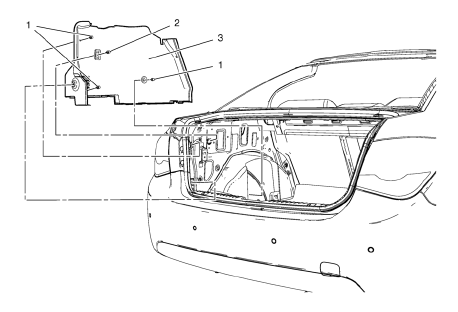
Preliminary Procedure
- Remove the rear side door sill trim plate. Refer to Rear Side Door Sill Trim Plate Replacement.
- Remove the rear seat back. Refer to Rear Seat Replacement.
- Remove the quarter window garnish molding. Refer to Quarter Window Garnish Molding Replacement.
- Rear Window Panel Trim Retainer Clip
- Body Side Trim Panel Retainer (Qty: 3)
- Body Side Trim Panel Assembly
Body Side Trim Panel Replacement - Right Side
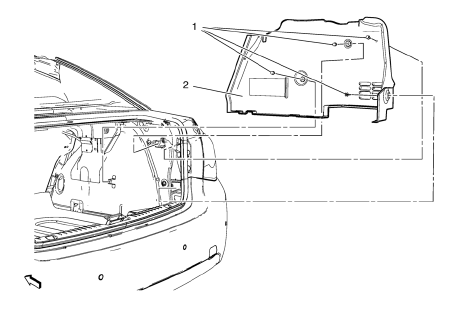
- Body Side Trim Panel Retainer (Qty: 4)
- Body Side Trim Panel Assembly
Radio Front Side Door Speaker Grille Bezel Replacement
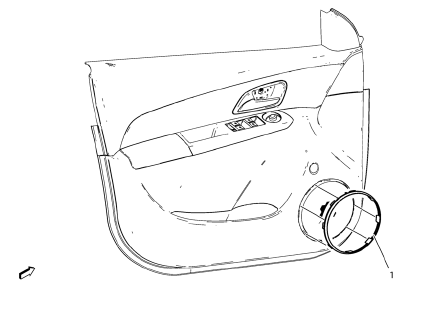
- Radio Front Side Door Speaker Grille Bezel Assembly
Radio Rear Side Door Speaker Grille Bezel Replacement
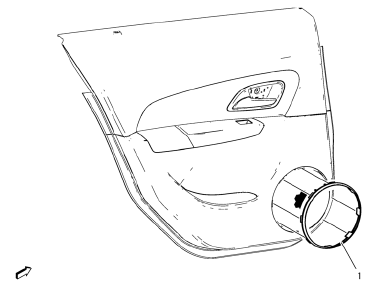
- Radio Rear Side Door Speaker Grille Bezel Assembly
Rear Window Panel Trim Replacement
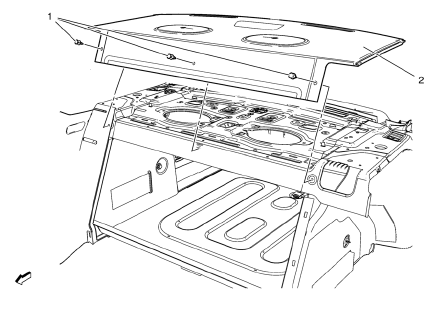
Preliminary Procedure
- Remove the rear seat back.
- Remove the high mount stop lamp. Refer to High Mount Stop Lamp Replacement.
- Rear Window Panel Trim Clip (Qty: 6)
- Rear Window Panel Trim Assembly
 Center Pillar Upper Garnish Molding Replacement
Preliminary Procedure
Remove the center pillar lower garnish molding. Refer to Center Pillar
Lower Ga rnish Molding Replacement
Remove the seat belt from the front seat. Refer ...
 Rear Side Door Trim Replacement
Rear Side Door Inside Handle Bolt Finish Cap
Procedure
Pull handle back to remove cap. Use suitable tool to unsnap.
Rear Side Door Inside Handle Screw
Caution: Refer to Fastener Caut ...
Other materials:
When It Is Time for New Tires
Factors such as maintenance, temperatures, driving speeds, vehicle loading, and
road conditions affect the wear rate of the tires.
Treadwear indicators are one way to tell when it is time for new tires.
Treadwear indicators appear when the tires have only 1.6mm (1/16 in) or less
of tread rem ...
Front Bumper Fascia Replacement
Preliminary Procedure
Remove the front bumper fascia opening cover. Refer to Front Bumper Fascia
Opening Lower Cover Replacement.
Front Wheelhouse Liner Bolt (Qty: 8)
Caution: Refer to Fastener Caution in the Preface section.
Tighten
2.5 N·m(23 lb in)
Front Bumper Fascia Bolt (Q ...
Transmission
Driver Shift Control (DSC) allows the automatic transmission to be shifted similar
to a manual transmission.
Electronic Range Select (ERS) allows for the selection of a range of gears.
Up-Shift Light
If the vehicle has a manual transmission, it will have an up-shift light that
indicates whe ...
