
Chevrolet Cruze Owners Manual: Climate Controls
The heating, cooling, defrosting, and ventilation for the vehicle can be controlled with these systems.
Vehicles without Air Conditioning
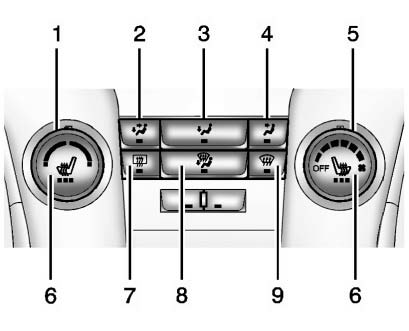
1. Temperature Control
2. Bi-level Air Mode
3. Floor Air Mode
4. Vent Air Mode
5. Fan Control
6. Driver and Passenger Heated Seats (If Equipped)
7. Rear Window Defogger
8. Defog
9. Defrost
Vehicles with Air Conditioning
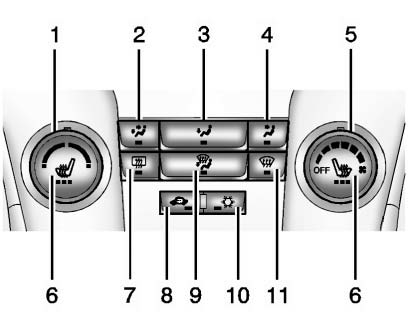
1. Temperature Control
2. Bi-level Air Mode
3. Floor Air Mode
4. Vent Air Mode
5. Fan Control
6. Driver and Passenger Heated Seats (If Equipped)
7. Rear Window Defogger
8. Recirculation
9. Defog
10. Air Conditioning
11. Defrost
Automatic Climate Control System
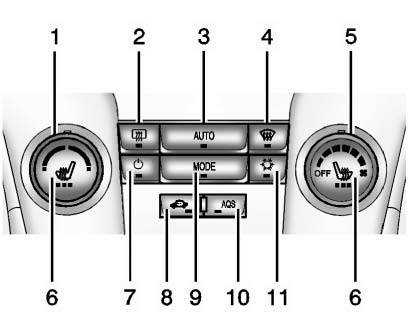
1. Temperature Control
2. Rear Window Defogger
3. AUTO (Automatic Operation)
4. Defrost
5. Fan Control
6. Driver and Passenger Heated Seats (If Equipped)
7. Power
8. Recirculation
9. MODE (Air Delivery Mode)
10. AQS (Air Quality Sensor)
11. Air Conditioning
 Windshield Wiper/Washer
The windshield wiper/washer lever is on the right side of the steering column.
With the ignition in ACC/ ACCESSORY or ON/RUN, move the windshield wiper lever to
select the wiper speed.
HI: Use ...
 Transmission
Driver Shift Control (DSC) allows the automatic transmission to be shifted similar
to a manual transmission.
Electronic Range Select (ERS) allows for the selection of a range of gears.
Up-Shift Li ...
Other materials:
Hood Adjustment
Hood
Caution: Refer to Fastener Caution in the Preface section.
Procedure
Loosen the hood hinge reinforcement nuts (Qty: 4).
Adjust the hood in order to obtain an even gap on both sides between the
hood and the fenders, the headlamps and
the front bumper fascia and so that the hood ...
Starter Switch Check
WARNING
When you are doing this inspection, the vehicle could move suddenly. If the
vehicle moves, you or others could be injured.
1. Before starting this check, be sure there is enough room around the vehicle.
2. Firmly apply both the parking brake and the regular brake.
Do not use the accele ...
Refrigerant Recovery and Recharging
Special Tools
GE-45037 A/C Oil Injector
For equivalent regional tools, refer to Special Tools.
Refrigerant Recovery and Recharging
Warning: To prevent personal injury, avoid breathing A/C Refrigerant
and lubricant vapor or mist. Work in a well ventilated area. To
remove refrigerant from the A ...
