
Chevrolet Cruze Owners Manual: Engine Air Cleaner/Filter
When to Inspect the Engine Air Cleaner/Filter
Inspect the air cleaner/filter at the scheduled maintenance intervals and replace it at the first oil change after each 80 000 km (50,000 mi) interval. If you are driving in dusty/dirty conditions, inspect the filter at each engine oil change.
How to Inspect the Engine Air Cleaner/Filter
To inspect the air cleaner/filter, remove the filter from the vehicle and lightly shake the filter to release loose dust and dirt. If the filter remains covered with dirt, a new filter is required.
To inspect or replace the engine air cleaner/filter:
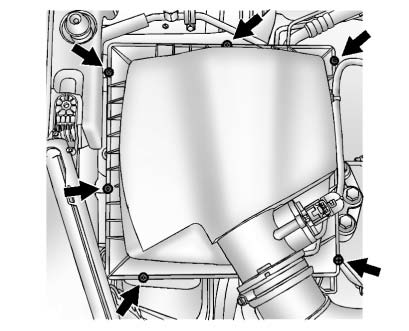
1.4L L4 Engine
1.8L L4 Engine
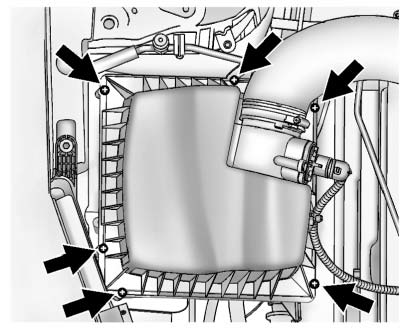
1. Remove the six screws that secure the cover on.
2. Lift off the cover.
3. Inspect or replace the engine air cleaner/filter.
4. Align the filter correctly.
5. Install the cover by lowering it over the filter and secure with the six screws.
WARNING
Operating the engine with the air cleaner/filter off can cause you or others to be burned. The air cleaner not only cleans the air; it helps to stop flames if the engine backfires. Use caution when working on the engine and do not drive with the air cleaner/filter off.
Notice
: If the air cleaner/filter is off, dirt can easily get into the engine, which could damage it.
Always have the air cleaner/filter in place when you are driving.
 Hydraulic Clutch
For vehicles with a manual transmission, it is not necessary to regularly check
brake/clutch fluid unless there is a leak suspected.
Adding fluid will not correct a leak.
A fluid loss in this syst ...
 Cooling System
The cooling system allows the engine to maintain the correct working temperature.
1.4L L4 Engine Shown, 1.8L L4 Engine Similar
1. Engine Cooling Fan (Out of View)
2. Engine Coolant Surge Tank and ...
Other materials:
Front Wheel Drive Shaft Replacement - Right Side
Special Tools
CH-313 Slide Hammer
CH-6003 Axle Shaft Remover
CH-49376 Holding Wrench
CH-49400 Hub Spindle Remover
DT-6332 Seal Protector
EN-956-1 Extension
For equivalent regional tools, refer to Special Tools.
Removal Procedure
Warning: To prevent personal injury and/or component ...
Removal Procedure
Warning: Refer to Glass and Sheet Metal Handling Warning in the Preface
section.
Disable the SIR System. Refer to SIR Disabling
and Enabling.
Disconnect the negative battery cable. Refer to Battery Negative Cable
Disconnection and Connection.
Remove the front side door. Refer t ...
Air Conditioning Compressor Replacement (1.6L LXT)
Preliminary Procedures
Recover the refrigerant. Refer to Refrigerant Rec overy and
Recharging.
Remove drive belt. Refer to Generator and Air Conditioning Compressor
and Power Steering Pump Belt Replacement.
Raise and support the vehicle. Refer to Lifting and Jacking the Vehic ...
