
Chevrolet Cruze Repair Manual: Front Fender Replacement
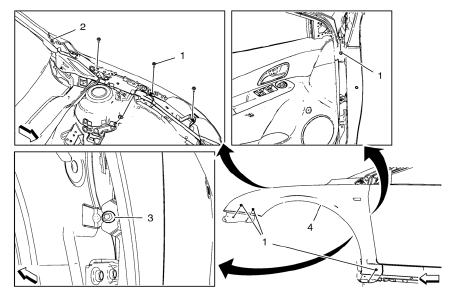
Preliminary Procedure
- Remove the front bumper fascia. Refer to Front Bumper Fascia Replacement
- Remove front bumper fascia guide. Refer to Front Bumper Fascia Replacement
- Remove the wheelhouse liner. Refer to Front Wheelhouse Liner Replacement
- Remove the headlamp. Refer to Headlamp Replacement
- Remove the air inlet grille panel. Refer to Air Inlet Grille Panel Replacement
- Remove the front fender shipping cover. Refer to Front Fender Shipping Cover Replacement
- Remove the front fender insulator. Refer to Front Fender Insulator Replacement
- Front Fender Bolt (Qty: 7)
Caution: Refer to Fastener Caution in the Preface section.
Tighten 8 N·m (70 lb in)
- Front Fender Bolt
Tighten 8 N·m (70 lb in)
- Front Fender Bolt
Tip Simply loosen the bolt rather than remove.
Tighten 8 N·m(70 lb in)
- Front Fender
Front Fender Shipping Cover Replacement
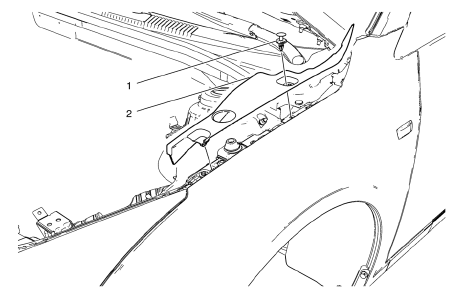
- Front Fender Insulator Retainer
- Front Fender Shipping Cover
 Rear Side Door Replacement
Preliminary Procedure
Remove the rear side door trim panel. Refer to Rear Side Door Trim
Replacement.
Rear Side Door Check Link Bolt
Caution: Refer to Fastener Caution in the Preface se ...
 Front Side Door Wiring Harness Replacement
Preliminary Procedure
Remove the front side door inner panel trim. Refer to Front Side Door Trim
Replacement.
Front Side Door Wiring Harness
Warning: Unless directed otherwise, the ignition a ...
Other materials:
Installation Procedure
Install the following components on the drivetrain and front suspension
frame:
CH 49460-1 adapter (2).
CH 49460-2 adapter (4).
CH 6615-10 hydraulic cylinder (1).
NEW frame insulator (3)
Note: Check marking of frame insulator.
Press carefully the frame insulator in to the ...
Vehicle Messages
Messages displayed on the DIC indicate the status of the vehicle or some action
that may be needed to correct a condition. Multiple messages may display one after
the other.
The messages that do not require immediate action can be acknowledged and cleared
by pressing SET/CLR. The messages tha ...
Quick Info
Quick Info gives access to quick information on Audio playing, OnStar Turn-by-Turn
route (if equipped), 5-day forecast, Nearby Fuel Stations, and Movie Show Times.
To access, press Quick Info on the Home Page or the INFO button on the faceplate.
Depending on the system and if the options are ...
