
Chevrolet Cruze Repair Manual: Front Side Door Replacement
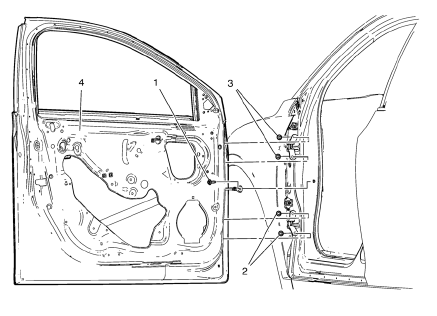
Preliminary Procedure
Remove the front side door trim panel. Refer to Front Side Door Trim Replacement.
- Front Side Door Check Link Bolt
Caution: Refer to Fastener Caution in the Preface section.
Procedure
- Remove the water deflector.
- Disconnect the door electrical connector.
- Support the door before removing the hinge bolts.
- With the aid of an assistant, remove the door.
Tighten 25 N·m (18 lb ft)
- Front Side Door Lower Hinge Bolt (Qty: 2)
Tighten 25 N·m (18 lb ft)
- Front Side Door Upper Hinge Bolt (Qty: 2)
Tighten 25 N·m (18 lb ft)
- Front Side Door
Procedure
- Transfer all of the internal components.
- Adjust the front side door as needed. Refer to Front Side Door Adjustment.
 Front Side Door Adjustment
Preliminary Procedure
Remove the front wheelhouse liner. Refer to Front Wheelhouse Liner
Replacement.
Front Side Door
Caution: Refer to Fastener Caution in the Preface section.
Procedure
...
 Rear Side Door Adjustment
Rear Side Door
Caution: Refer to Fastener Caution in the Preface section.
Procedure
Loosen the rear door hinge bolt (Qty: 4) to adjust the rear door.
Adjust the rear door in order to ...
Other materials:
Interior Care
To prevent dirt particle abrasions, regularly clean the vehicle's interior.
Immediately remove any soils. Note that newspapers or dark garments that can
transfer color to home furnishings can also permanently transfer color to the vehicle's
interior.
Use a soft bristle brush to remove ...
Compact Spare Tire
WARNING
Driving with more than one compact spare tire at a time could result in loss
of braking and handling. This could lead to a crash and you or others could be injured.
Use only one compact spare tire at a time.
If this vehicle has a compact spare tire, it was fully inflated when new; howe ...
Radio Reception
Frequency interference and static can occur during normal radio reception if
items such as cell phone chargers, vehicle convenience accessories, and external
electronic devices are plugged into the accessory power outlet. If there is interference
or static, unplug the item from the accessory p ...
