
Chevrolet Cruze Owners Manual: Fuel Gauge
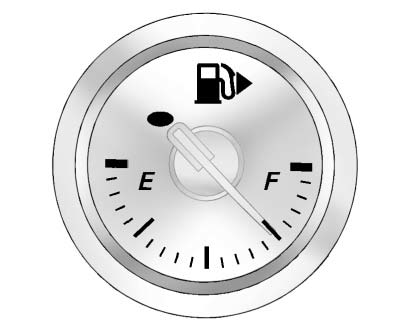
When the ignition is on, the fuel gauge indicates about how much fuel is left in the tank.
An arrow on the fuel gauge indicates the side of the vehicle the fuel door is on.
A FUEL LEVEL LOW message may appear in the Driver Information Center (DIC) and a single chime sounds.
Here are four things that some owners ask about. None of these show a problem
with the fuel gauge:
• At the service station, the fuel pump shuts off before the gauge reads full.
• It takes a little more or less fuel to fill up than the gauge indicated. For example, the gauge may have indicated the tank was half full, but it actually took a little more or less than half the tank's capacity to fill the tank.
• The gauge moves a little while turning a corner or speeding up.
• The gauge takes a few seconds to stabilize after the ignition is turned on, and will go back to empty when the ignition is turned off.
 Tachometer
The tachometer displays the engine speed in revolutions per minute (rpm).
Notice: If the engine is operated with the tachometer in the shaded
warning area, the vehicle could be damaged, and the dam ...
 Engine Coolant Temperature Gauge
This gauge shows the engine coolant temperature.
If the indicator needle moves to the hot side of the gauge toward the H or shaded
area, the engine is too hot.
If the vehicle has been operated u ...
Other materials:
Rear Wheel Bearing and Hub Replacement (Drum Brake)
Special Tools
EN 45059 Torque Angle Sensor Kit
For equivalent regional tools, refer to Special Tools.
Removal Procedure
Raise and suitably support the vehicle. Refer to Lifting and
Jacking the Vehicle.
Remove the tire and wheel assembly. Refer to Tire and Wheel Removal and
...
Fuel and Evaporative Emission Pipe Warning
Warning: In order to reduce the risk of fire and personal injury observe
the following items:
Replace all nylon fuel pipes that are nicked, scratched or damaged
during installation, do not attempt to repair the sections of the
nylon fuel pipes
Do not hammer directly on the fuel harness ...
Installation Procedure
Cut the body lock pillar outer panel in corresponding locations to fit
the remaining original panel. The sectioning joint should be
trimmed to allow a gap of one-and-one-half-times the metal thickness at the
sectioning joint.
Create a 50 mm (2 in) backing plate from the unused porti ...
