
Chevrolet Cruze Owners Manual: Heated Seats
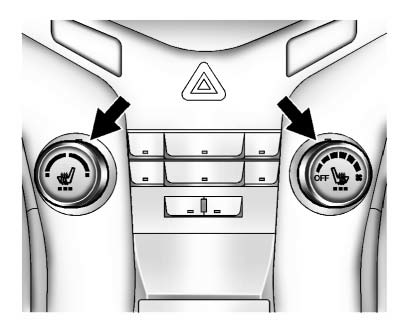
If available, the controls are on the center stack. The engine must be running to operate the heated seats.
Press  or
or
 to heat the driver or passenger seat
cushion and seatback.
to heat the driver or passenger seat
cushion and seatback.
Press the control once for the highest setting. With each press of the control, the heated seat will change to the next lower setting, and then the off setting. Three lights indicate the highest setting and one light the lowest.
 Seat Adjustment
Manual Front Seats
To adjust a manual seat:
1. Pull the handle at the front of the seat.
2. Slide the seat to the desired position and release the handle.
3. Try to move the seat back and forth ...
 Head Restraint Adjustment
Do not drive until the head restraints for all occupants are installed and adjusted
properly.
To achieve a comfortable seating position, change the seatback recline angle
as little as necessary w ...
Other materials:
Paint Gauges
Paint thickness gauge. measure the total thickness of the vehicle finish. It
is important to accurately measure the thickness of the finish on
each vehicle as the thickness of the finish will vary on each vehicle. Use a
paint gauge before the sanding process in order to accurately
measure how ...
Trailer Towing (Except Fuel Economy Model)
Before pulling a trailer, there are three important considerations that have
to do with weight:
• The weight of the trailer.
• The weight of the trailer tongue.
• The total weight on your vehicle's tires.
Weight of the Trailer
How heavy can a trailer safely be? It should never weigh more ...
Retained Accessory Power (RAP)
These vehicle accessories may be used for up to 10 minutes after the engine is
turned off:
• Audio System
• Power Windows
• Sunroof
The power windows and sunroof will continue to work for up to 10 minutes or until
any door is opened. The radio will work when the key is in ON/RUN or ACC/ ACCE ...
