
Chevrolet Cruze Repair Manual: Installation Procedure
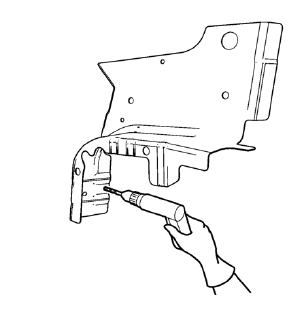
- Create 5 x 18 mm (4/16 x 11/16 in) slots for MIG-Brazing along the edges of the front wheelhouse panel rear reinforcement as noted from the original panel.
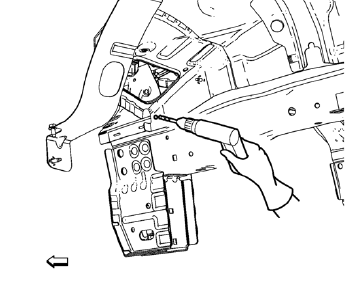
- Create a 5 x 18 mm (4/16 x 11/16 in) slot for MIG-Brazing where front wheelhouse front panel and front wheelhouse panel rear reinforcement overlap.
- Clean and prepare the attaching surfaces for brazing.
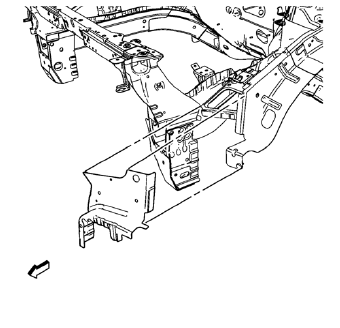
- Position the front wheelhouse panel rear reinforcement on the vehicle.
- Verify the fit of the front wheelhouse panel rear reinforcement.
- Clamp the front wheelhouse panel rear reinforcement into position.
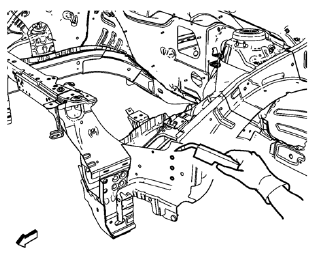
- Braze accordingly.
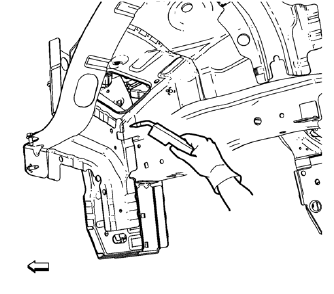
- Braze the joint from front wheelhouse panel rear reinforcement to front wheelhouse front panel accordingly.
- Apply the sealers and anti-corrosion materials to the repair area, as necessary. Refer to Anti-Corrosion Treatment and Repair.
- Paint the repaired area. Refer to Basecoat/Clearcoat Paint Systems.
- Install all related panels and components.
- Connect the negative battery cable. Refer to Battery Negative Cable Disconnection and Connection.
- Enable the SIR system. Refer to SIR Disabling and Enabling.
 Removal Procedure
Warning: Refer to Approved Equipment for Collision Repair Warning in the
Preface section.
Warning: Refer to Glass and Sheet Metal Handling Warning in the Preface section.
Disable the SIR Syst ...
 Front Compartment Upper Side Rail Replacement (MAG-Welding)
Note: According to different corrosion warranties, only the
regional mandatory joining methods are allowed. ...
Other materials:
Windshield Wiper/Washer
The windshield wiper/washer lever is on the right side of the steering column.
With the ignition in ACC/ ACCESSORY or ON/RUN, move the windshield wiper lever to
select the wiper speed.
HI: Use for fast wipes.
LO: Use for slow wipes.
INT: Move the lever up to INT for intermittent wipes, th ...
Removal Procedure
Warning: Refer to Approved Equipment for Collision Repair Warning in
the Preface section.
Warning: Refer to Glass and Sheet Metal Handling Warning in the Preface
section.
Disable the SIR System. Refer to SIR Disabling and Enabling.
Disconnect the negative battery cable. Refer to Bat ...
Traction Control System (TCS)
The vehicle has a Traction Control System (TCS) that limits wheel spin.
On a front-wheel-drive vehicle, the system operates if it senses that one or
both of the front wheels are spinning or beginning to lose traction. When this happens,
the system brakes the spinning wheel(s), and/or reduces en ...
