
Chevrolet Cruze Repair Manual: Installation Procedure
- Prepare all mating surfaces as necessary.
- Align the body lock pillar outer panel reinforcement.
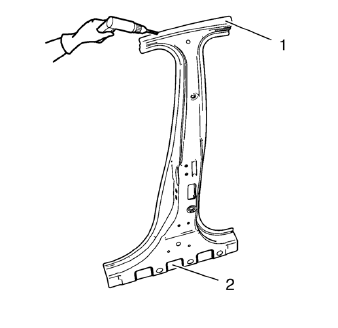
- Create 8 x 24 mm (5/16 x 15/16 in) slots for MIG-brazing upper (1) and lower (2).
- Clean and prepare the attaching surfaces for spot welding and brazing.
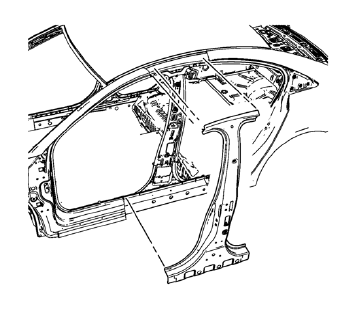
- Position the body lock pillar outer panel reinforcement on the vehicle.
- Verify the fit of the body lock pillar outer panel reinforcement
- Clamp the body lock pillar outer panel reinforcement into position.
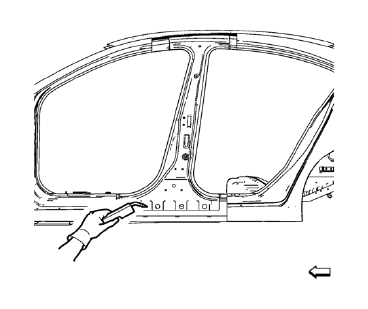
- Braze accordingly.
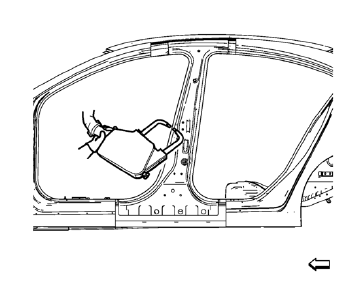
- Spot weld accordingly
- Apply the sealers and anti-corrosion materials to the repair area, as necessary. Refer to Anti-Corrosion Treatment and Repair.
- Paint the repaired area. Refer to Basecoat/Clearcoat Paint Systems.
- Install all related panels and components.
- Connect the negative battery cable. Refer to Battery Negative Cable Disconnection and Connection.
- Enable the SIR system. Refer to SIR Disabling and Enabling.
 Removal Procedure
Warning: Refer to Approved Equipment for Collision Repair Warning in the
Preface section.
Warning: Refer to Glass and Sheet Metal Handling Warning in the Preface section.
Disable the SIR Syst ...
 Body Lock Pillar Inner Panel Replacement (MAG-Welding)
Note: According to different corrosion warranties, only the
regional mandatory joining methods are allowed. ...
Other materials:
Air Conditioning Evaporator Hose Assembly Replacement
Preliminary Procedures
Recover the refrigerant. Refer to Refrigerant Recovery and Recharging.
Remove the headlamp - right side. Refer to Headlamp Replacement.
Loosen power steering fluid reservoir screw.
Remove brake pipes from the dash lower extension panel.
Remove engine mount. Ref ...
Removal Procedure
Warning: Refer to Approved Equipment for Collision Repair Warning in the
Preface section.
Warning: Refer to Collision Sectioning Warning in the Preface section.
Warning: Refer to Glass and Sheet Metal Handling Warning in the Preface section.
Disable the SIR System. Refer to SIR
...
GM Mobility Reimbursement Program
This program is available to qualified applicants for cost reimbursement of eligible
aftermarket adaptive equipment required for the vehicle, such as hand controls or
a wheelchair/ scooter lift for the vehicle.
For more information on the limited offer, visit www.gmmobility.com or call the
...
