
Chevrolet Cruze Repair Manual: Installation Procedure
- Clean and prepare the attaching surfaces for welding.
- Apply structural adhesive to the attaching flanges.
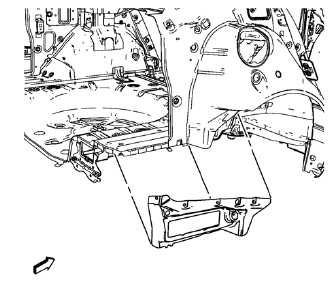
- Position the body side outer lower panel on the vehicle
- Verify the fit of the body side outer lower panel.
- Clamp the body side outer lower panel into position.
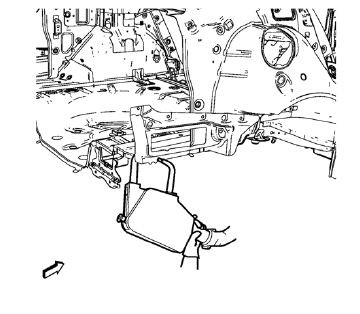
- Spot weld accordingly.
- Apply the sealers and anti-corrosion materials to the repair area, as necessary. Refer to Anti-Corrosion Treatment and Repair.
- Paint the repaired area. Refer to Basecoat/Clearcoat Paint Systems.
- Install all related panels and components.
- Connect the negative battery cable. Refer to Battery Negative Cable Disconnection and Connection.
- Enable the SIR system. Refer to SIR Disabling and Enabling.
 Removal Procedure
Warning: Refer to Approved Equipment for Collision Repair Warning in the
Preface section.
Warning: Refer to Glass and Sheet Metal Handling Warning in the Preface section.
Disable the SIR Syst ...
 Rear Compartment Floor Panel Sectioning (MAG-Welding)
Note: According to different corrosion warranties, only the
regional mandatory joining methods are allowed. ...
Other materials:
Traction Control System (TCS)
The traction control system limits wheel spin. The system is on when the vehicle
is started.
• To turn off traction control, press and release
on the center console.
illuminates in the instrument cluster.
• Press and release again to turn traction
control back on. ...
Map Data Updates
The map data in the vehicle is the most up-to-date information available when
the vehicle was produced. The map data is updated periodically, provided that the
map information has changed.
For questions about the operation of the navigation system or the update process,
contact the GM Nav Dis ...
Air Vents
Adjustable air vents are in the center and on the side of the instrument panel.
Move the slats (1) to change the direction of the airflow.
Use the thumbwheels (2) near the air vents to open or close off the airflow.
Additional air vents are located beneath the windshield, driver and passenger
...
