
Chevrolet Cruze Repair Manual: Installation Procedure
- Clean and prepare the attaching surfaces for welding.
- Apply structural adhesive to the attaching surfaces.
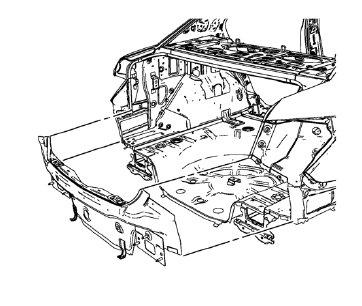
- Position the body rear end panel on the vehicle.
- Verify the fit of the body rear end panel.
- Clamp the body rear end panel into position.
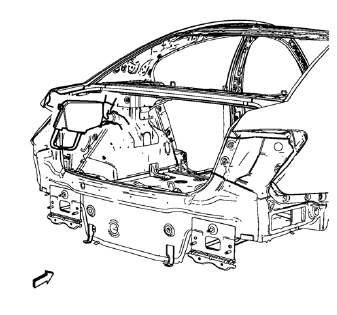
- Spot weld accordingly as noted from the original part.
- Apply the sealers and anti-corrosion materials to the repair area, as necessary. Refer to Anti-Corrosion Treatment and Repair.
- Paint the repaired area. Refer to Basecoat/Clearcoat Paint Systems.
- Install all related panels and components.
- Connect the negative battery cable. Refer to Battery Negative Cable Disconnection and Connection.
- Enable the SIR system. Refer to SIR Disabling and Enabling.
 Removal Procedure
Warning: Refer to Approved Equipment for Collision Repair Warning in the
Preface section.
Warning: Refer to Glass and Sheet Metal Handling Warning in the Preface section.
Disable the SIR Syst ...
 Rear Bumper Impact Bar Stud Plate Replacement (MAG-Welding)
Note: According to different corrosion warranties, only the
regional mandatory joining methods are allowed. ...
Other materials:
Rear Brake Rotor Replacement
Special Tools
CH 41013 Rotor Resurfacing Kit
CH 42450-A Wheel Hub Resurfacing Kit
For equivalent regional tools, refer to Special Tools.
Removal Procedure
Warning: Refer to Brake Dust Warning in the Preface section.
Remove rear brake caliper bracket. Refer to Rear Brake Caliper Br ...
Visual Aiming Preparation Procedure
Important: Some state and local laws specify requirements for
headlamp aim. Comply with all of these laws when performing any
headlamp aiming operations.
Headlamp aim should be checked:
When a new headlamp capsule is installed.
If service or repairs to the front end area have, or may have, ...
Steering Wheel Controls
For vehicles with audio steering wheel controls, some audio controls can be adjusted
at the steering wheel.
: For vehicles with a Bluetooth,
OnStar, or navigation system, press to interact with those systems.
: Press to silence the vehicle speakers
only. Press again to turn the sound on. ...
