
Chevrolet Cruze Repair Manual: Installation Procedure
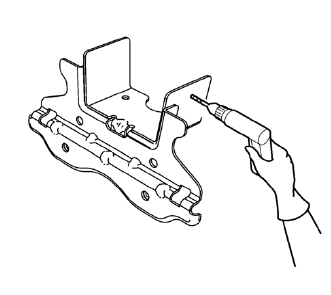
- Create 8 24 mm (5/16 x 15/16 in) slots for MIG-brazing along the edges of the underbody rear side rail reinforcement as noted from the original panel.
- Clean and prepare the attaching surfaces for brazing.
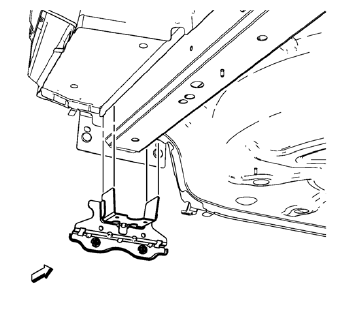
- Position the underbody rear side rail reinforcement on the vehicle.
- Verify the fit of the underbody rear side rail reinforcement.
- Clamp the underbody rear side rail reinforcement into position.
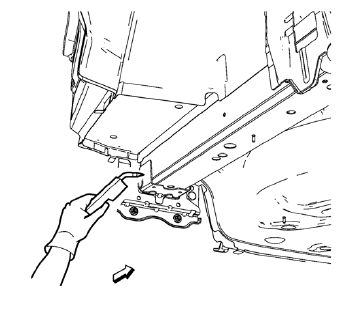
- Braze accordingly.
- Apply the sealers and anti-corrosion materials to the repair area, as necessary. Refer to Anti-Corrosion Treatment and Repair.
- Paint the repaired area. Refer to Basecoat/Clearcoat Paint Systems.
- Install all related panels and components.
- Connect the negative battery cable. Refer to Battery Negative Cable Disconnection and Connection.
- Enable the SIR system. Refer to SIR Disabling and Enabling.
 Removal Procedure
Warning: Refer to Approved Equipment for Collision Repair Warning in the
Preface section.
Warning: Refer to Glass and Sheet Metal Handling Warning in the Preface section.
Disable the SIR Syst ...
 Rear Floor Panel Filler Replacement (MAG-Welding)
Note: According to different corrosion warranties, only the
regional mandatory joining methods are allowed. ...
Other materials:
Airbag System
The vehicle has the following airbags:
• A frontal airbag for the driver.
• A frontal airbag for the front outboard passenger.
• A knee airbag for the driver.
• A knee airbag for the front outboard passenger.
• A seat-mounted side impact airbag for the driver.
• A seat-mounted side impac ...
Exterior Care
Washing the Vehicle
To preserve the vehicle's finish, wash it often and out of direct sunlight.
Notice: Do not use petroleum-based, acidic, or abrasive cleaning agents
as they can damage the vehicle's paint, metal, or plastic parts.
If damage occurs, it would not be covered by the vehic ...
Securing Child Restraints (Front Passenger Seat)
This vehicle has airbags. A rear seat is a safer place to secure a forward-facing
child restraint.
In addition, the vehicle has a passenger sensing system which is designed to
turn off the right front passenger frontal airbag and passenger knee airbag under
certain conditions.
A label on the ...
