
Chevrolet Cruze Owners Manual: Instrument Panel Illumination Control
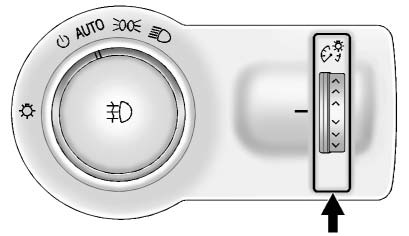
This feature controls the brightness of the instrument panel controls and infotainment display screen. The thumbwheel is to the left of the steering column on the instrument panel.
 (Instrument Panel Brightness):
Move the thumbwheel up or down and hold, to brighten or dim the instrument panel controls and infotainment display screen.

 Courtesy Lamps
The courtesy lamps come on automatically when any door is opened and the dome
lamp is in the door position. ...
Other materials:
Object Detection System Messages
PARK ASSIST OFF
This message displays when the park assist system has been turned off or when
there is a temporary condition causing the system to be disabled.
SERVICE PARK ASSIST
This message displays if there is a problem with the Ultrasonic Rear Parking
Assist (URPA) system. Do not use thi ...
Traction Control System (TCS)
The traction control system limits wheel spin. The system is on when the vehicle
is started.
• To turn off traction control, press and release
on the center console.
illuminates in the instrument cluster.
• Press and release again to turn traction
control back on. ...
Rear Side Door Window Regulator Motor Replacement
Preliminary Procedure
Remove the rear side door window regulator. Refer to Rear Side Door Window
Regulator Replacement.
Rear Side Door Window Regulator Motor Screw (Qty: 3)
Caution: Refer to Fastener Caution in the Preface section.
Tighten
9 N·m (80 lb in)
Rear Side Door Window R ...
