
Chevrolet Cruze Owners Manual: Remote Keyless Entry (RKE) System
The Remote Keyless Entry (RKE) transmitter may work up to 60m (195 ft) away from the vehicle.
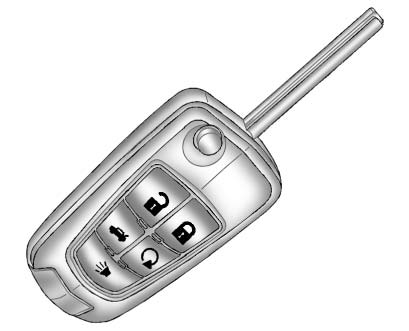
RKE Transmitter with Remote Start Shown
Press the key release button to extend the key blade. The key can be used for the ignition and all locks.
Press  to unlock the driver door
or all doors.
to unlock the driver door
or all doors.
Press  to lock all doors.
Lock and unlock feedback can be personalized.
Press and hold  briefly to open the
trunk.
briefly to open the
trunk.
Press and hold  briefly to initiate
vehicle locator.
briefly to initiate
vehicle locator.
Press and hold for at least three
seconds to sound the panic alarm.
for at least three
seconds to sound the panic alarm.
Press again to cancel the panic alarm.
 Initial Drive Information
This section provides a brief overview about some of the important features that
may or may not be on your specific vehicle.
For more detailed information, refer to each of the features which can b ...
 Remote Vehicle Start
For vehicles with this feature, the engine can be started from outside the vehicle.
Starting the Vehicle
1. Aim the RKE transmitter at the vehicle.
2. Press and release .
3. Immediately after comp ...
Other materials:
Removal Procedure
Warning: Refer to Approved Equipment for Collision Repair Warning in
the Preface section.
Disable the SIR System. Refer to SIR Disabling
and Enabling.
Disconnect the negative battery cable. Refer to Battery Negative Cable
Disconnection and Connection.
Remove all related panels ...
Child Restraint Systems
Rear-Facing Infant Seat
A rear-facing infant seat provides restraint with the seating surface against
the back of the infant.
The harness system holds the infant in place and, in a crash, acts to keep the
infant positioned in the restraint.
Forward-Facing Child Seat
A forward-facing chil ...
Connections
OnStar Hands-Free Calling allows calls to be made and received from the vehicle.
The vehicle can also be controlled from a cell phone through the OnStar RemoteLink
mobile app.
For coverage maps, see www.onstar.com (U.S.), www.onstar.ca (Canada).
Hands-Free Calling
1. Press . System responds: ...
