
Chevrolet Cruze Repair Manual: Removal Procedure
Warning: Refer to Approved Equipment for Collision Repair Warning in the Preface section.
Warning: Refer to Collision Sectioning Warning in the Preface section.
Warning: Refer to Glass and Sheet Metal Handling Warning in the Preface section.
- Disable the SIR System. Refer to SIR Disabling and Enabling.
- Disconnect the negative battery cable. Refer to Battery Negative Cable Disconnection and Connection.
- Remove all related panels and components.
- Visually inspect the damage. Repair as much of the damage as possible.
- Remove the sealers and anti-corrosion materials from the repair area, as necessary. Refer to Anti-Corrosion Treatment and Repair.
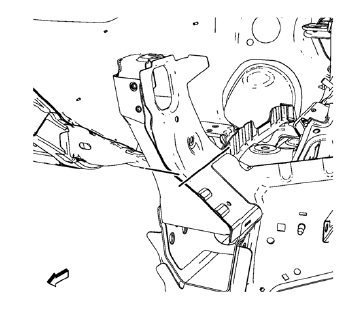
- Create cut lines on the front end upper tie bar.
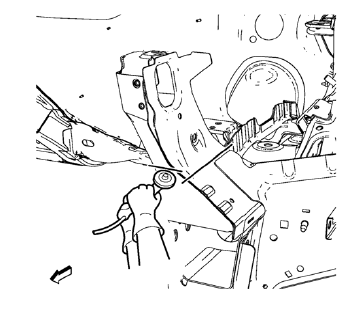
- Cut the panel where sectioning is to be performed.
Note: Do not damage any inner panels or reinforcements.
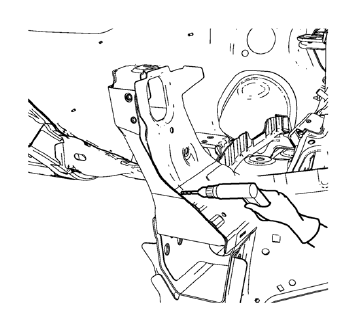
- Locate and mark all the necessary factory welds of the front end upper tie bar.
- Drill all factory welds. Note the number and location of welds for installation of the service assembly.
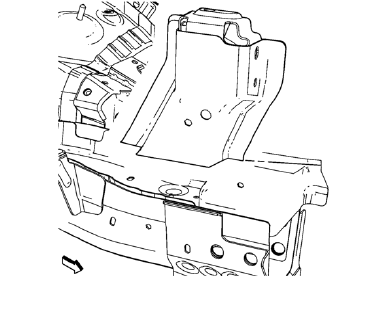
- Remove the damaged front end upper tie bar.
 Front End Upper Tie Bar Support Sectioning (MIG Brazing)
Note: According to different corrosion warranties, only the
regional mandatory joining methods are allowed. ...
 Installation Procedure
Cut the front end upper tie bar in corresponding locations to fit the
remaining original panel. The sectioning joint should be trimmed
to allow a gap of one-and-one-half-times the metal th ...
Other materials:
Instrument Panel Tie Bar Replacement (Right Hand Drive)
Removal Procedure
Remove instrument panel compartment. Refer to Instrument Panel
Compartment Replacement.
Remove instrument panel wiring harness (2) from instrument panel tie bar
(1).
Disconnect electrical connectors.
Remove instrument panel tie bar (1).
Remov ...
Water Hose Test
Note: Use a water hose without the nozzle attached.
Have an assistant inside of the vehicle i 1. n order to locate the leak.
Begin testing at the base of the window or the windshield.
Slowly move the hose upward and across the top of the vehicle.
...
Radio Reception
Frequency interference and static can occur during normal radio reception if
items such as phone chargers, vehicle convenience accessories, and external electronic
devices are plugged into the accessory power outlet. If there is interference or
static, unplug the item from the accessory power ...
