
Chevrolet Cruze Repair Manual: Removal Procedure
Warning: Refer to Approved Equipment for Collision Repair Warning in the Preface section.
Warning: Refer to Glass and Sheet Metal Handling Warning in the Preface section.
- Disable the SIR System. Refer to SIR Disabling and Enabling.
- Disconnect the negative battery cable. Refer to Battery Negative Cable Disconnection and Connection.
- Remove all related panels and components.
- Visually inspect the damage. Repair as much of the damage as possible.
- Remove the sealers and anti-corrosion materials from the repair area, as necessary. Refer to Anti-Corrosion Treatment and Repair.
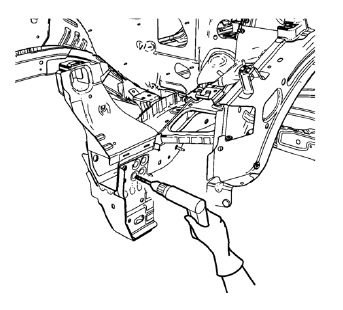
- Locate and mark all the necessary factory welds and weld seams of the drivetrain and front suspension frame front support.
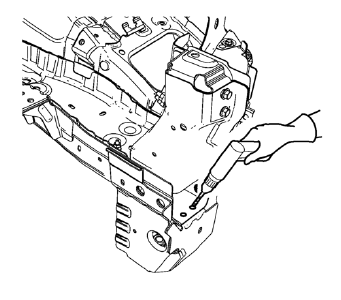
- Drill out front flange of front suspension support frame from above through the front compartment side rail.
Note: Drill holes are necessary for later plug welds.
- Drill all factory welds. Note the number and location of welds for installation of the service assembly.
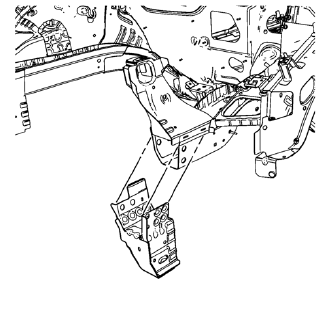
- Remove the drivetrain and front suspension frame front support.
 Drivetrain and Front Suspension Frame Front Support Replacement (MAG-Welding)
Note: According to different corrosion warranties, only the
regional mandatory joining methods are allowed. ...
 Installation Procedure
Drill 8 mm (5/16 in) for plug welding along the edges of the drivetrain
and front suspension frame front support as noted from the
original panel.
Clean and prepare the attaching &n ...
Other materials:
Instrument Panel Wiring Harness Replacement
Removal Procedure
Remove instrument panel compartment assembly. Refer to Instrument
Panel Compartment Replacement.
Remove instrument panel wiring harness (2) from instrument panel tie bar
(1).
Disconnect electrical connectors.
Installation Procedure
Ins ...
Rear Bumper Fascia Outer Guide Replacement
Preliminary Procedure
Remove the rear bumper fascia. Refer to Rear Bumper Fascia Replacement.
Rear Bumper Fascia Outer Guide Rivet (Qty: 3)
Special Tools
BO-594-A Hand Rivet Tongs
For equivalent regional tools, refer to Special Tools.
Rear Bumper Fascia Outer Guide
...
Power Steering Fluid Reservoir Replacement
Preliminary Procedure
Remove as much power steering fluid from the remote power steering fluid
reservoir as possible.
Place drain pans under the vehicle as needed.
Hose Clamp
Procedure
Compress the power steering fluid reservoir outlet and inlet hose clamp
from the power ...
