
Chevrolet Cruze Repair Manual: Removal Procedure
Warning: Refer to Approved Equipment for Collision Repair Warning in the Preface section.
Warning: Refer to Glass and Sheet Metal Handling Warning in the Preface section.
- Disable the SIR System. Refer to SIR Disabling and Enabling.
- Disconnect the negative battery cable. Refer to Battery Negative Cable Disconnection and Connection.
- Remove all related panels and components.
- Visually inspect the damage. Repair as much of the damage as possible.
- Remove the sealers and anti-corrosion materials from the repair area, as necessary. Refer to Anti-Corrosion Treatment and Repair.
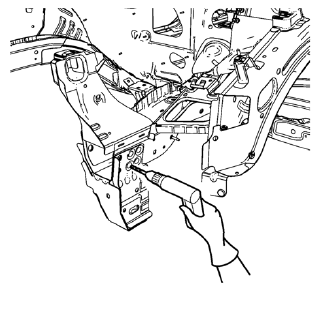
- Locate and mark all the necessary factory welds and weld seams of the drivetrain and front suspension frame front support.
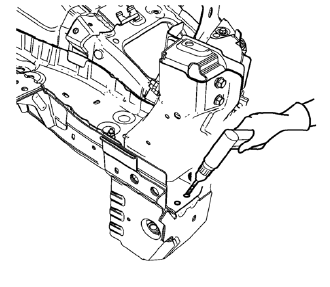
- Drill out front flange of front suspension support frame from above through the front compartment side rail.
Note: Create slots for MIG-Brazing out of drill holes.
- Drill all factory welds. Note the number and location of welds for installation of the service assembly.
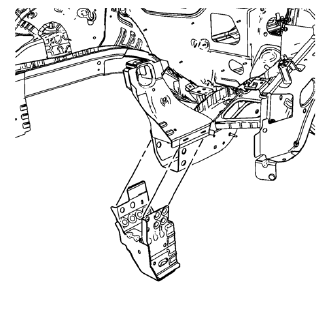
- Remove the drivetrain and front suspension frame front support.
 Drivetrain and Front Suspension Frame Front Support Replacement (MIG-Brazing)
Note: According to different corrosion warranties, only the
regional mandatory joining methods are allowed. ...
 Installation Procedure
Create 8 x 14 mm (5/16 x 15/16 in) slots for MIG-Brazing along the edges
of the drivetrain and front suspension frame front support
as noted from the original panel.
Clean and prepare th ...
Other materials:
Older Children
Older children who have outgrown booster seats should wear the vehicle safety
belts.
The manufacturer instructions that come with the booster seat state the weight
and height limitations for that booster. Use a booster seat with a lap-shoulder
belt until the child passes the fit test below: ...
Front Seat Cushion Cover and Pad Replacement
Removal Procedure
Warning: Refer to SIR Warning in the Preface section.
Warning: Replace the passenger presence system as a complete assembly to prevent
possible injury to the occupant. The bladder, the
pressure sensor, the seat cushion, and the control module are assembled and
calibrated a ...
Wheel Replacement
Replace any wheel that is bent, cracked, or badly rusted or corroded. If wheel
nuts keep coming loose, the wheel, wheel bolts, and wheel nuts should be replaced.
If the wheel leaks air, replace it.
Some aluminum wheels can be repaired. See your dealer if any of these conditions
exist.
Your de ...
