
Chevrolet Cruze Repair Manual: Removal Procedure
Warning: Refer to Approved Equipment for Collision Repair Warning in the Preface section.
- Disable the SIR System. Refer to SIR Disabling and Enabling.
- Disconnect the negative battery cable. Refer to Battery Negative Cable Disconnection and Connection.
- Remove all related panels and components.
- Visually inspect the damage. Repair as much of the damage as possible.
- Remove the sealers and anti-corrosion materials from the repair area, as necessary. Refer to Anti-Corrosion Treatment and Repair.
- Locate and mark all factory welds.
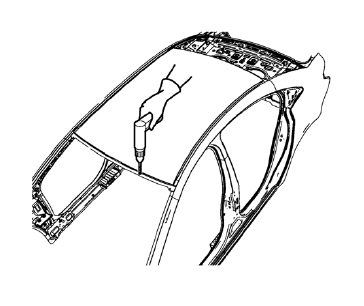
- Drill all factory welds. Note the number and location of welds for installation of the service assembly.
- Cut the adhesive with an appropriate tool.
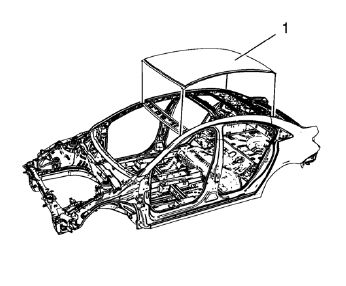
- Remove the damaged roof panel (1).
 Roof Outer Panel Replacement (MIG-Brazing)
Note: According to different corrosion warranties, only the
regional mandatory joining methods are allowed. ...
 Installation Procedure
Clean and prepare the attaching surfaces for welding.
Apply one-part windshield urethane adhesive as noted from the original
panel.
Position the roof panel (1) on the
...
Other materials:
Rear Side Door Weatherstrip Replacement - Door Side
Rear Side Door Check Bolt
Caution: Refer to Fastener Caution in the Preface section.
Tighten
25 N·m (19 lb ft)
Rear Side Door Weatherstrip - Door Side
Procedure
Unclip weatherstrip from rear side door.
When removing protective liners from adhesive tape, be care ...
Pretensioner Handling and Scrapping
Special Tools
EL-38826 SIR Deployment Harness
EL-39401-B SIR Deployment Fixture
For equivalent regional tools, refer to Special Tools.
Warning: When you are carrying an undeployed seat belt pretensioner:
Do not carry the seat belt pretensioner by the wires or connector on the
preten ...
Traction Control System (TCS)
The traction control system limits wheel spin. The system is on when the vehicle
is started.
• To turn off traction control, press and release
on the center console.
illuminates in the instrument cluster.
• Press and release again to turn traction
control back on. ...
