
Chevrolet Cruze Owners Manual: Roof
Sunroof
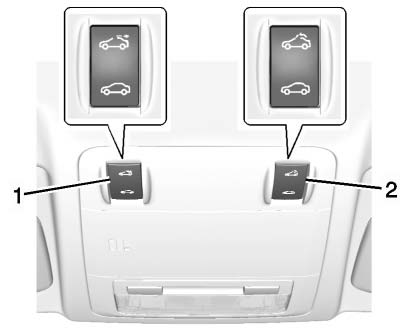
The sunroof only operates when the ignition is in ON/RUN or ACC/ ACCESSORY, or when Retained Accessory Power (RAP) is active.
To open or close the sunroof, press the open or close sunroof switch (1) to the first detent position.
To express open or close the sunroof with the safety function enabled, press the open or close sunroof switch (1) to the second detent position and release. To stop the movement, press the switch again.
To automatically tilt or close the sunroof, press the tilt open or close sunroof switch (2).
If an object is in the path of the sunroof while it is closing, the anti-pinch feature will detect the object and stop the sunroof.
The sunroof glass panel cannot be opened or closed if the vehicle has an electrical failure.
Sunshade
The sunshade is manually operated.
Close or open the sunshade by sliding. When the sunroof is opened, the sunshade is always open.
Safety Function
If the sunroof has any resistance during automatic closing, it will immediately stop and reverse.
To override the safety function, press and hold the close sunroof switch. The sunroof closes without the safety function. To stop the movement, release the switch.
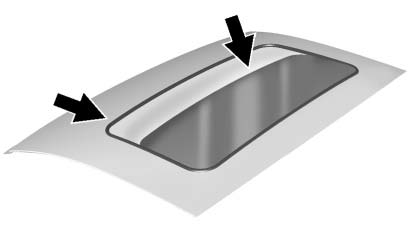
Dirt and debris may collect on the sunroof seal or in the track. This could cause an issue with sunroof operation, noise, or plugging within the water drainage system.
Periodically open the sunroof and remove any obstacles or loose debris. Wipe the sunroof seal and roof sealing area using a clean cloth, mild soap, and water. Do not remove grease from the sunroof.
If water is seen dripping into the water drainage system, this is normal.
 Sun Visors
Pull the sun visor down to block glare. Detach the sun visor from the center
mount to pivot to the side window, or to extend along the rod, if available. ...

Other materials:
Compact Spare Tire
WARNING
Driving with more than one compact spare tire at a time could result in loss
of braking and handling. This could lead to a crash and you or others could be injured.
Use only one compact spare tire at a time.
If this vehicle has a compact spare tire, it was fully inflated when new; howe ...
Rear Compartment Lid Emblem/Nameplate Replacement (Chevrolet)
Rear Compartment Lid Emblem Assembly
Caution: Refer to Exterior Trim Emblem Removal Caution in the Preface
section.
Procedure
The part and surface should be 21°C (70°F) prior to installation. The
vehicle should remain 21°C (70°F) for
one hour after assembly to allow adhesive to deve ...
Ashtrays
For vehicles with a removable ashtray, the ashtray can be placed into the front
console cupholders.
To open the ashtray, lift the lid of the ashtray. After using, close the lid.
To empty the ashtray for cleaning, slightly turn the upper part of the ashtray
counterclockwise and remove it.
Noti ...
