
Chevrolet Cruze Owners Manual: Steering Wheel Adjustment
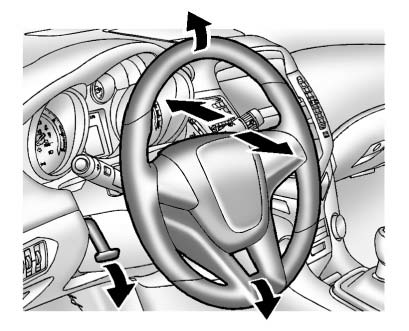
To adjust the steering wheel: 1. Pull the lever down.
2. Move the steering wheel up or down.
3. Pull or push the steering wheel closer or away from you.
4. Push the lever up to lock the steering wheel in place.
Do not adjust the steering wheel while driving.
 Controls
...
 Steering Wheel Controls
For vehicles with audio steering wheel controls, some audio controls can be adjusted
at the steering wheel.
(Push to Talk): For vehicles with
a Bluetooth, OnStar, or navigation system, press t ...
Other materials:
Brake System Warning Light
The vehicle brake system consists of two hydraulic circuits. If one circuit is
not working, the remaining circuit can still work to stop the vehicle. For normal
braking performance, both circuits need to be working.
If the warning light comes on, there is a brake problem. Have the brake system ...
Front Side Door Replacement
Preliminary Procedure
Remove the front side door trim panel. Refer to Front Side Door Trim
Replacement.
Front Side Door Check Link Bolt
Caution: Refer to Fastener Caution in the Preface section.
Procedure
Remove the water deflector.
Disconnect the door electrical connector.
Su ...
Headlining Trim Panel Replacement (With Sunroof)
Warning: Do not attempt to repair or alter the head impact
energy-absorbing material glued to the headliner or to the garnish
trims. If the material is damaged, replace the headliner and/or the garnish
trim. Failure to do so could result in personal injury.
Caution: If a vehicle is equip ...
