
Chevrolet Cruze Owners Manual: Turn and Lane-Change Signals
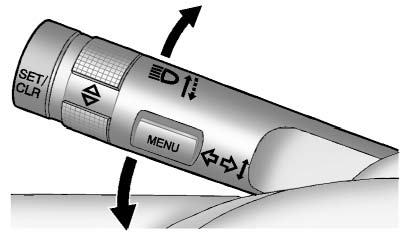
Move the lever all the way up or down to signal a turn.
An arrow on the instrument cluster will flash in the direction of the turn or lane change.
Raise or lower the lever until the arrow starts to flash to signal a lane change. The turn signal flashes three times.
The lever returns to its starting position when it is released.
If after signaling a turn or lane change the arrow flashes rapidly or does not come on, a signal bulb may be burned out. Replace any burned out bulbs. If a bulb is not burned out, check the fuse.
 Hazard Warning Flashers
(Hazard Warning Flasher):
Press and momentarily hold this button on the instrument panel above the climate
control system, to make the front and rear turn signal lamps flash on and off. This
...
 Front Fog Lamps
For vehicles with front fog lamps, the button is on the outboard side of the
instrument panel.
The ignition must be on to turn on the fog lamps.
(Front Fog Lamps): Press
to turn the fog lamps ...
Other materials:
Front Lower Control Arm Bushing Replacement
Preliminary Procedure
Raise and support the vehicle. Refer to Lifting and Jacking the
Vehicle.
Remove the tire and wheel. Refer to Tire and Wheel Removal and
Installation.
Remove the lower control arm. Refer to Lower Control Arm Replacement.
Lower Control Arm Rear Bushing ...
If a Tire Goes Flat
It is unusual for a tire to blowout while driving, especially if the tires are
maintained properly. If air goes out of a tire, it is much more likely to leak out
slowly. But if there ever is a blowout, here are a few tips about what to expect
and what to do: If a front tire fails, the flat tir ...
Rear Seats
Either side of the rear seatback can be folded.
To fold the rear seatbacks:
1. Place the front seatbacks in the upright position.
Notice: Folding a rear seat with the safety belts still fastened may
cause damage to the seat or the safety belts. Always unbuckle the safety belts and
return them ...
