
Chevrolet Cruze Repair Manual: Vehicle Certification, Tire Placard, Anti-Theft, and Service Parts ID Label
Vehicle Certification Label
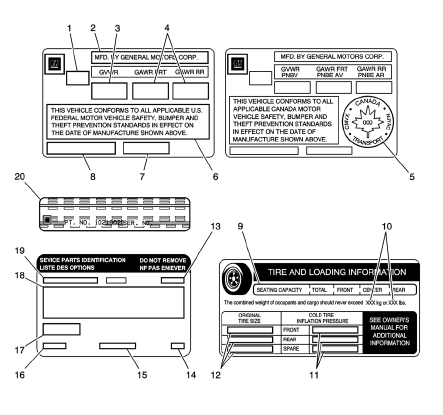
The vehicle certification label is located on the driver door and displays the following assessments:
Gross Vehicle Weight Rating (GVWR)
Gross Axle Weight Rating (GAWR), front and rear
The gross vehicle weight (GVW) is the weight of the vehicle and everything it carries. The gross vehicle weight must not exceed the Gross Vehicle Weight Rating. Include the following items when figuring the GVW:
- The base vehicle weight (factory weight)
- The weight of all vehicles accessories
- The weight of the driver and the passengers
- The weight of the cargo
- Name of Manufacturer
- Gross Vehicle Weight Rating
- Gross Axle Weight Rating (Front, Rear)
- Canadian Safety Mark (w/RPO Z49)
- Certification Statement
- Vehicle Class Type (Pass Car, etc.)
- Vehicle Identification Number
- Date of Manufacture (Mo/Yr)
Tire Placard
The tire placard label is located on the driver door and displays the following assessments:
- Specified Occupant Seating Positions
- Maximum Vehicle Capacity Weight
- Original Equipment Tires Size
- Tire Pressure, Front, Rear, and Spare (Cold)
Service Parts ID Label
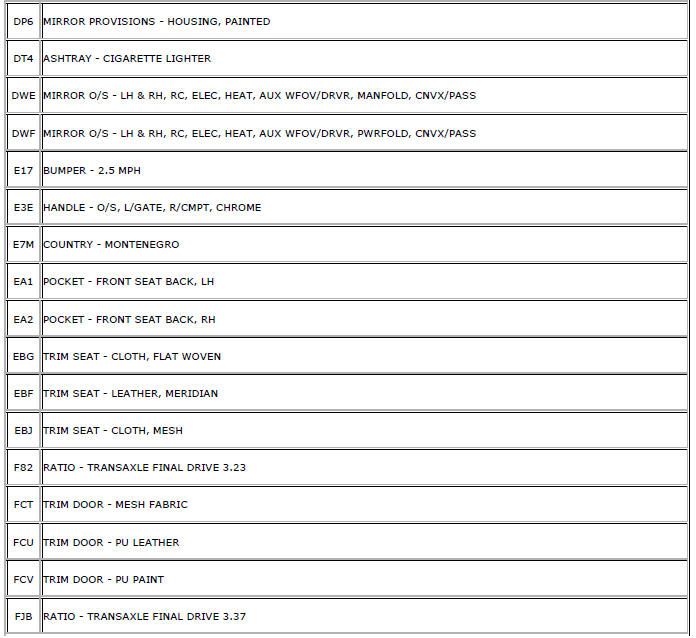
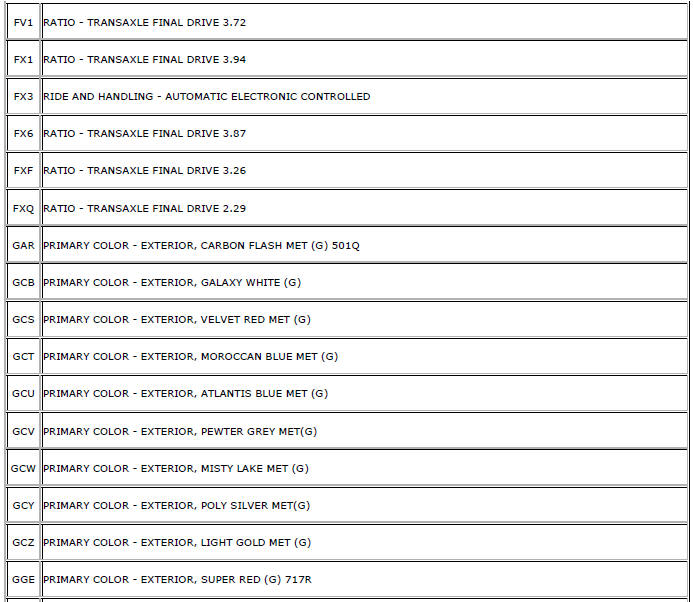
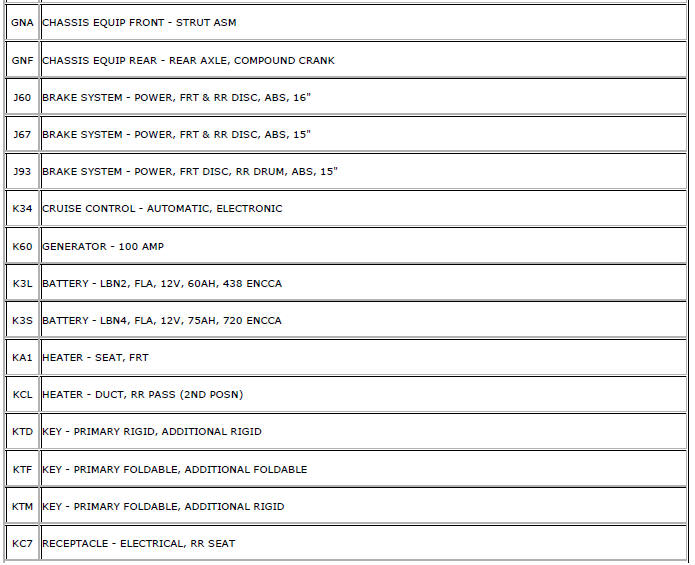
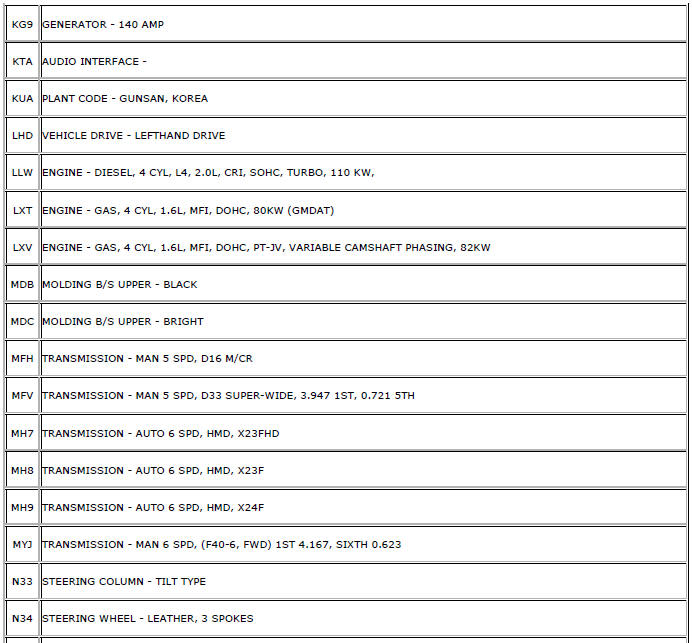
The vehicle service parts identification label is located in the rear compartment under the spare tire cover. The label is use to help identify the vehicle original parts and options.
- Vehicle Identification Number
- Engineering Model Number (Vehicle Division, Line, and Body Style)
- Interior Trim Level and Decor
- Exterior (Paint Color) WA Number
- Paint Technology
- Special Order Paint Colors and Numbers
- Vehicle Option Content
Anti-Theft Label
- The Federal law requires that General Motors label certain body parts on
this vehicle with the VIN. The purpose of the law
is to reduce the number of motor vehicle thefts by helping in the tracing
and recovery of parts from stolen vehicles.
Labels are permanently affixed to an interior surface of the part. The label on the replacement part contains the letter R, the manufacturer's logo, and the DOT symbol.
The anti-theft label must be covered before any painting, rustproofing procedures, and uncovered after the procedures.
Failure to follow the precautionary steps may result in liability for violation of the Federal Vehicle Theft Prevention Standard and possible suspicion to the owner that the part was stolen.
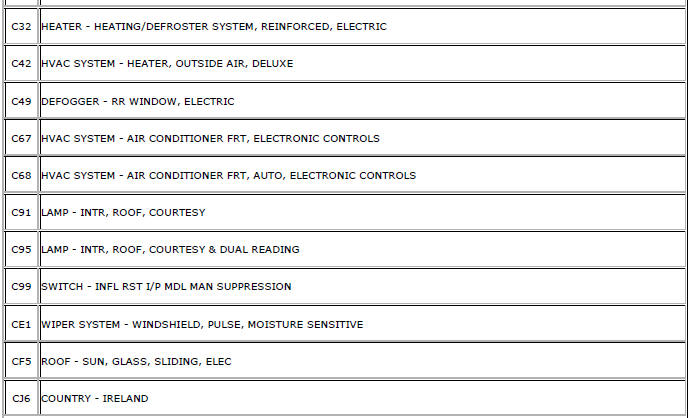
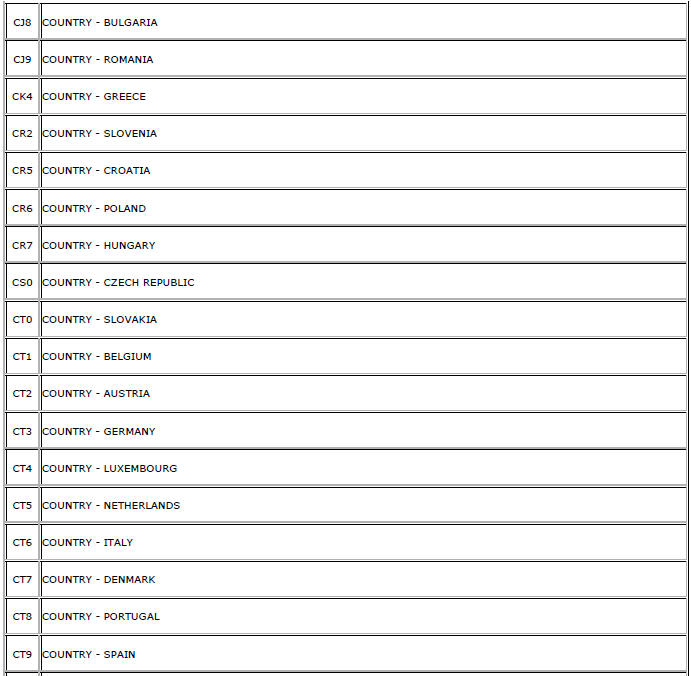
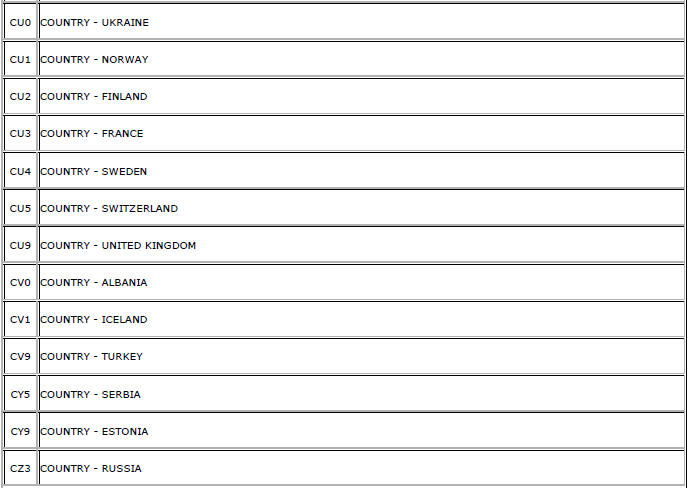
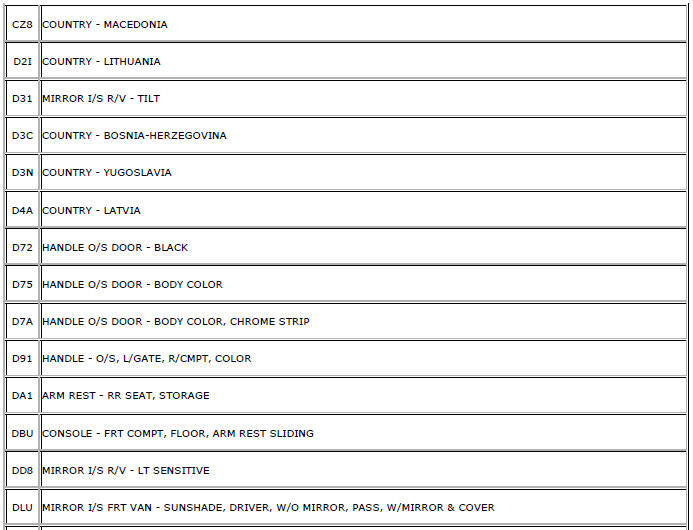
RPO Code List (GME)
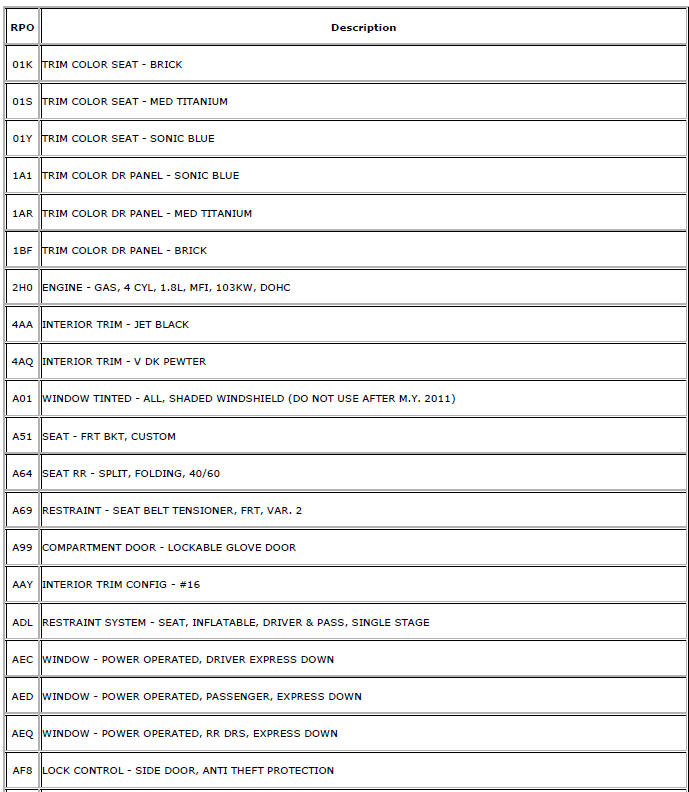
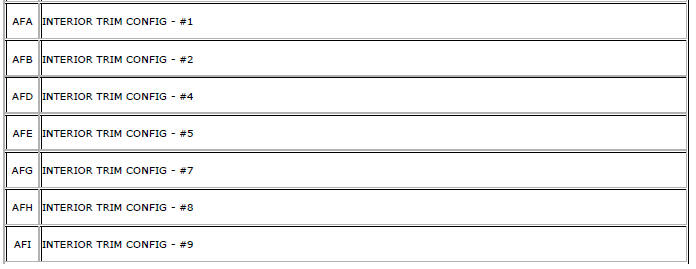
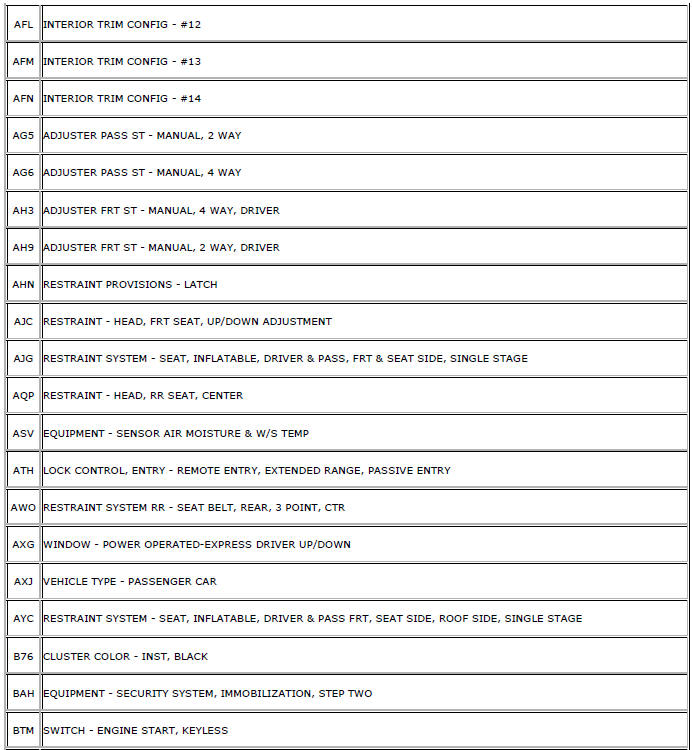
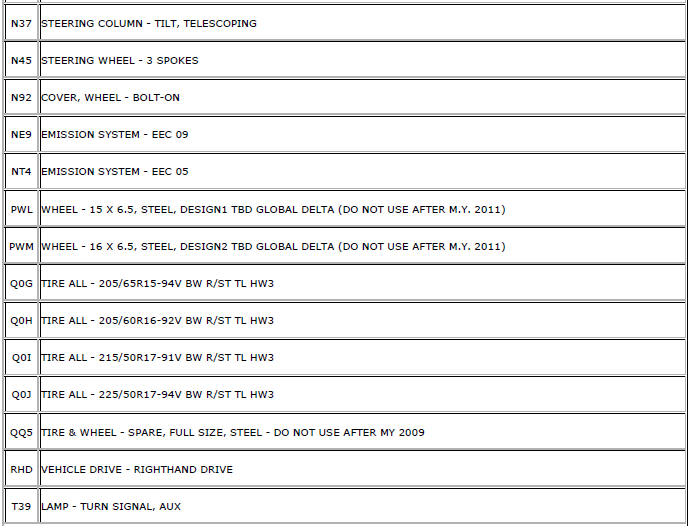
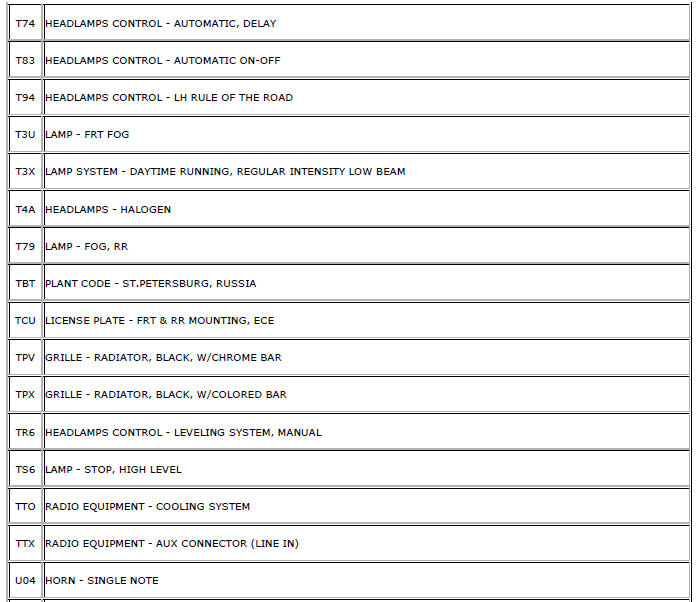
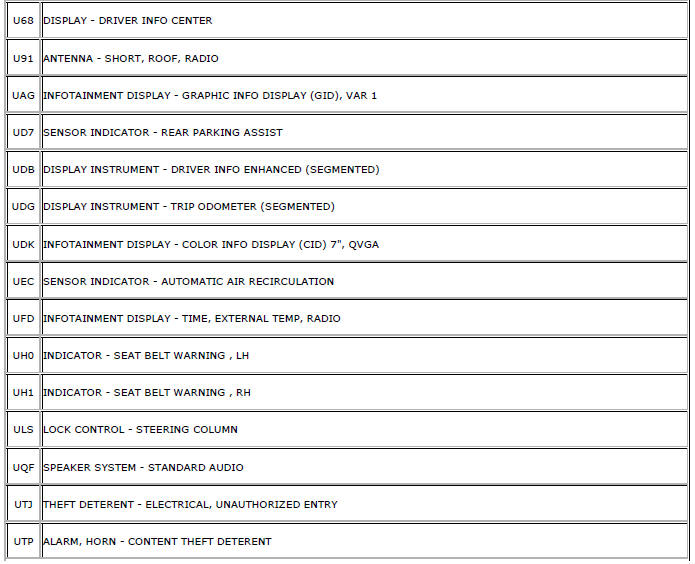
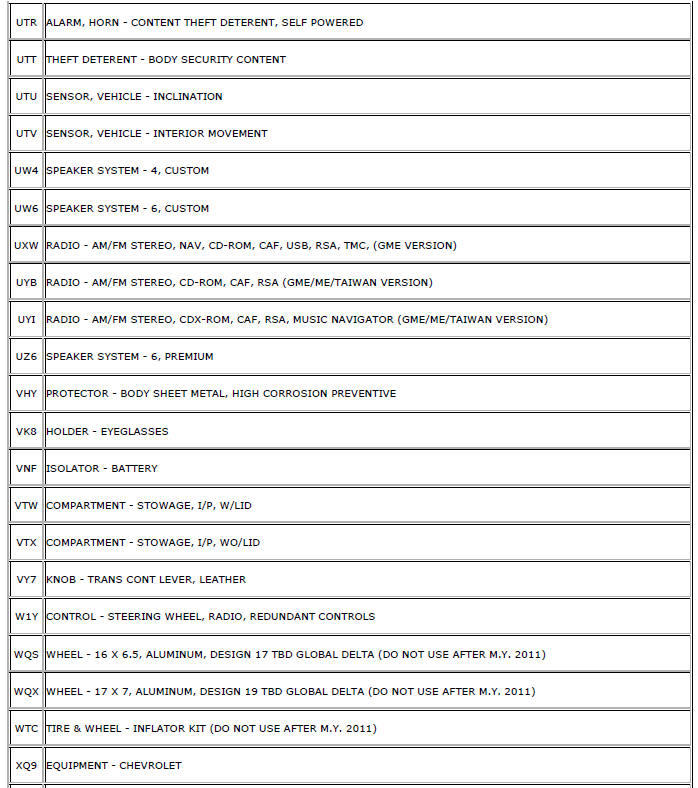
The following table provides the description of the Regular Production Option (RPO) codes that are available on the vehicle. The vehicle's RPO list is printed on the Service Parts Identification Label.

 Vehicle, Engine and Transmission ID and VIN Location, Derivative and Usage
Note:: Graphic shows exemplary VIN.
The VIN plate is the legal identifier of the vehicle. The VIN plate is
located on the upper left corner of the instrument panel (I/P) and can
be seen throug ...
 Fasteners
Table 1: Metric Prevailing Torque Fastener Minimum Torque Development
Table 2: English Prevailing Torque Fastener Minimum Torque Development ...
Other materials:
Brake Pedal Position Sensor Calibration
Calibration Criteria
Note: Do not apply the brake pedal during the brake pedal position
(BPP) sensor calibration procedure. Any movement of the brake pedal
during this procedure will cause the calibration procedure to fail. If this
occurs, the sensor calibration must be repeated.
Brake pedal ...
Front Brake Rotor Replacement
Special Tools
CH-41013 Rotor Resurfacing Kit
CH-42450-A Wheel Hub Resurfacing Kit
For equivalent regional tools, refer to Special Tools.
Removal Procedure
Warning: Refer to Brake Dust Warning in the Preface section.
Raise and support the vehicle. Refer to Lifting and Jacking ...
Removal Procedure
Warning: Refer to Approved Equipment for Collision Repair Warning in the
Preface section.
Warning: Refer to Glass and Sheet Metal Handling Warning in the Preface section.
Disable the SIR System. Refer to SIR
Disabling and Enabling.
Disconnect the negative battery cable. Refer to ...
