
Chevrolet Cruze Owners Manual: Air Vents
Adjustable air vents are in the center and on the side of the instrument panel.
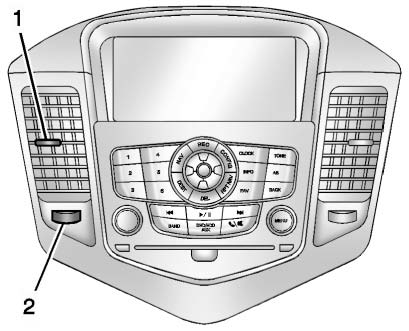
Move the slats (1) to change the direction of the airflow.
Use the thumbwheels (2) near the air vents to open or close off the airflow.
Additional air vents are located beneath the windshield, driver and passenger side door windows, and in the footwells. These are fixed and cannot be adjusted.
Operation Tips
• Clear away any ice, snow, or leaves from air inlets at the base of the windshield that could block the flow of air into the vehicle.
• Keep the path under the front seats clear of objects to help circulate the air inside of the vehicle more effectively.
• Use of non-GM approved hood deflectors can adversely affect the performance of the system.
Check with your dealer before adding equipment to the outside of the vehicle.
 Climate Control Systems
The heating, cooling, defrosting, and ventilation for the vehicle can be controlled with these systems.
Vehicles without Air Conditioning
1. Temperature Control.
2. Bi-level Air Mode.
...
 Maintenance
...
Other materials:
What Will You See after an Airbag Inflates?
After the frontal airbags and seat-mounted side impact airbags inflate, they
quickly deflate, so quickly that some people may not even realize an airbag inflated.
Roof-rail airbags may still be at least partially inflated for some time after
they inflate. Some components of the airbag module ma ...
Interior Lamps Dimming
This group includes lamps which may dim. This group may use a combination of
vacuum fluorescent illumination, LEDs and incandescent
lamps
HVAC control module, head assembly
Rear HVAC control module, head assembly
Radio
Rear seat audio
The instrument panel cluster
The PRNDL lamp, wit ...
Removal Procedure
Warning: Refer to Approved Equipment for Collision Repair Warning in
the Preface section.
Disable the SIR System. Refer to SIR Disabling
and Enabling.
Disconnect the negative battery cable. Refer to Battery Negative Cable
Disconnection and Connection.
Remove all related panels ...
