
Chevrolet Cruze Owners Manual: Hood
To open the hood:
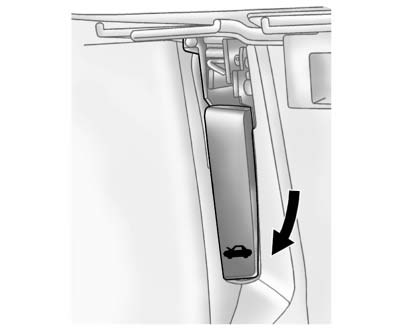
1. Pull up on the hood release handle. It is located inside the vehicle to the left of the steering column.
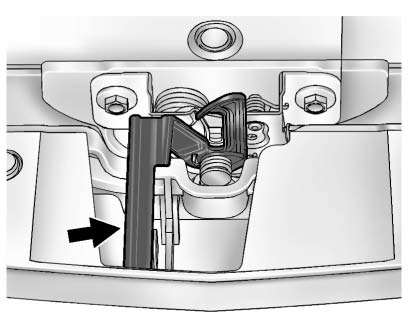
2. Go to the front of the vehicle and push the secondary hood release handle toward the driver side of the vehicle.
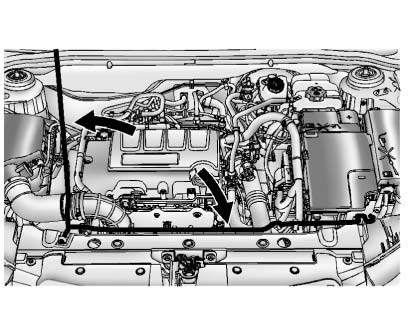
3. Lift the hood and release the hood prop from its retainer, located above the radiator.
Securely place the hood prop into the slot on the underside of the hood.
To close the hood:
1. Before closing the hood, be sure all the filler caps are on properly.
Then, lift the hood to relieve pressure on the hood prop.
Remove the hood prop from the slot on the underside of the hood and return the prop to its retainer. The prop rod must click into place when returning it to the retainer to prevent hood damage.
2. Lower the hood 30 cm (12 in) above the vehicle and release it so it fully latches. Check to make sure the hood is closed and repeat the process if necessary.
 Doing Your Own Service Work
WARNING
It can be dangerous to work on your vehicle if you do not have the proper
knowledge, service manual, tools, or parts. Always follow owner manual procedures
and consult the service manual ...
 Engine Compartment Overview
1.4L L4 Engine
1. Engine Air Cleaner/Filter
2. Engine Oil Dipstick.
3. Engine Cooling Fan (Out of View).
4. Engine Oil Fill Cap.
5. Remote Negative (-) Grounding Point.
6. Brake/Clutch ...
Other materials:
Tire Sidewall Labeling
Useful information about a tire is molded into its sidewall. The examples show
a typical passenger vehicle tire and a compact spare tire sidewall.
Passenger (P-Metric) Tire Example
(1) Tire Size: The tire size is a combination of letters and numbers used
to define a particular tire's wid ...
Introduction
The names, logos, emblems, slogans, vehicle model names, and vehicle body designs
appearing in this manual including, but not limited to, GM, the GM logo, CHEVROLET,
the CHEVROLET Emblem, and CRUZE are trademarks and/or service marks of General Motors
LLC, its subsidiaries, affiliates, or li ...
Removal Procedure
Warning: Refer to Approved Equipment for Collision Repair Warning in the
Preface section.
Warning: Refer to Collision Sectioning Warning in the Preface section.
Warning: Refer to Glass and Sheet Metal Handling Warning in the Preface section.
Disable the SIR System. Refer to SIR Dis ...
