
Chevrolet Cruze Owners Manual: Maintenance Replacement Parts
Replacement parts identified here by name, part number, or specification can be obtained from your dealer.
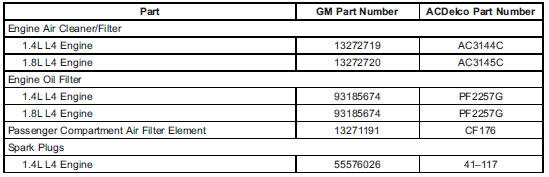


 Maintenance Records
After the scheduled services are performed, record the date, odometer reading,
who performed the service, and the type of services performed in the boxes provided.
Retain all maintenance receipts. ...
Other materials:
Lap-Shoulder Belt
All seating positions in the vehicle have a lap-shoulder belt.
The following instructions explain how to wear a lap-shoulder belt properly.
1. Adjust the seat, if the seat is adjustable, so you can sit up straight. To
see how, see “Seats” in the Index.
2. Pick up the latch plate and pull the ...
Vehicle Messages
Messages displayed on the DIC indicate the status of the vehicle or some action
that may be needed to correct a condition. Multiple messages may display one after
the other.
The messages that do not require immediate action can be acknowledged and cleared
by pressing SET/CLR. The messages tha ...
Installation Procedure
Install the following components on the drivetrain and front suspension
frame if removed:
The radiator support brackets.
The stabilizer shaft--Refer to Stabilizer Shaft Replacement.
The lower control arms--Refer to Lower Control Arm Replacement.
The steering gear--Refer to Steering ...
