
Chevrolet Cruze Owners Manual: Power Mirrors
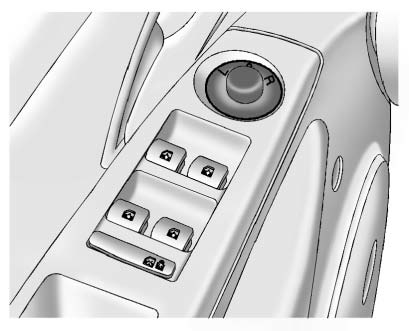
To adjust the mirror: 1. Turn the selector switch to L (Left) or R (Right) to choose the driver or passenger mirror.
2. Move the control to adjust the mirror.
3. Turn the selector switch to the O position to deselect the mirror.
 Manual Mirrors
Vehicles with a manual mirror adjustment have controls next to each mirror.
Adjust the inside rearview mirror by moving it up and down or side to side. Adjust
the mirror to avoid glare from the h ...
 Folding Mirrors
Manual Folding Mirrors
The vehicle has manual folding mirrors. These mirrors can be folded inward to
prevent damage when going through an automatic car wash. To fold, pull the mirror
toward the v ...
Other materials:
Map Data Updates
The map data in the vehicle is the most up-to-date information available when
the vehicle was produced. The map data is updated periodically, provided that the
map information has changed.
For questions about the operation of the navigation system or the update process,
contact the GM Nav Dis ...
Fuses and Circuit Breakers
The wiring circuits in the vehicle are protected from short circuits by a combination
of fuses and circuit breakers. This greatly reduces the chance of damage caused
by electrical problems.
To check a fuse, look at the silver-colored band inside the fuse.
If the band is broken or melted, repla ...
Frame and Underbody
Specifications
Engine Shield Replacement
Preliminary Procedure
Raise and support the vehicle. Refer to Lifting and Jacking the Vehicle.
Engine Shield Bolt (Qty: 4)
Caution: Refer to Fastener Caution in the Preface section.
Tighten
40 N·m (30 lb ft)
Engine Shield
Front Comp ...
