
Chevrolet Cruze Repair Manual: Rear Compartment Lid Emblem/Nameplate Replacement (Bowtie)
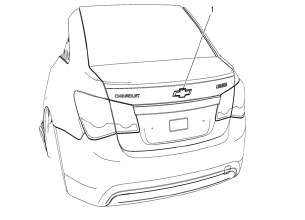
Rear Compartment Lid Emblem Assembly
Caution: Refer to Exterior Trim Emblem Removal Caution in the Preface section.
Procedure
- The part and surface should be 21°C (70°F) prior to installation. The vehicle should remain 21°C (70°F) for one hour after assembly to allow adhesive to develop sufficient bond strength
- Use a Heat Gun or equivalent to remove the old nameplate. Clean all adhesive from the rear compartment panel and wipe the surface dry with a clean lint-free towel prior to installing the new nameplate.
- When removing protective liners from the adhesive tape, be careful not to touch tape with hands and do not allow tape to come in contact with dirt or any foreign matter prior to adhesion.
- Close the rear compartment lid prior to adhesion.
- Using the palm of the hand, wet out the emblem to the rear compartment lid to ensure full adhesion of the emblem is made.
 Front Fog Lamp Bezel Replacement
Preliminary Procedure
Remove front bumper fascia. Refer to Front B 1. umper Fascia
Replacement.
Remove front fog lamp. Refer to Front Fog Lamp Replacement.
Front Fog Lamp Bezel Scre ...
 Rear Compartment Lid Emblem/Nameplate Replacement (Chevrolet)
Rear Compartment Lid Emblem Assembly
Caution: Refer to Exterior Trim Emblem Removal Caution in the Preface
section.
Procedure
The part and surface should be 21°C (70°F) prior to installati ...
Other materials:
Removal Procedure
Warning: Refer to Approved Equipment for Collision Repair Warning in the
Preface section.
Warning: Refer to Collision Sectioning Warning in the Preface section.
Warning: Refer to Glass and Sheet Metal Handling Warning in the Preface section.
Disable the SIR System. Refer to SIR Dis ...
Remote Vehicle Start
The vehicle may have this feature that allows you to start the engine from outside
the vehicle.
(Remote Vehicle Start):
This button will be on the RKE transmitter if the vehicle has remote start.
The climate control system will use the previous settings during a remote start.
The rear defog ...
Front End Inflatable Restraint Discriminating Sensor Replacement
Warning: Refer to SIR Warning in the Preface section.
Warning: Following the deployment of a side impact air bag, inspect the
following parts for damage. Replace these parts if
necessary:
The seat cushion frame
The seat recliner, if equipped
The seat adjuster
The seat back frame
...
