
Chevrolet Cruze Owners Manual: Storing the Tire Sealant and Compressor Kit
The tire sealant and compressor kit is located in the trunk, under the load floor, behind an access panel.
To remove the kit:
1. Open the trunk.
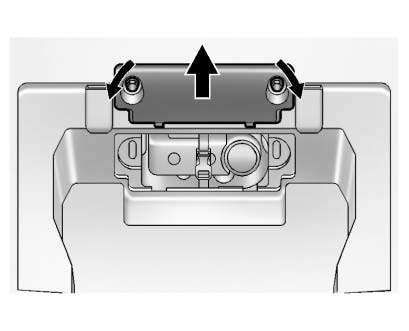
2. Turn the left knob counterclockwise and the right knob clockwise, 90 degrees, at the same time. Then pull the access panel rearward and up to remove it.
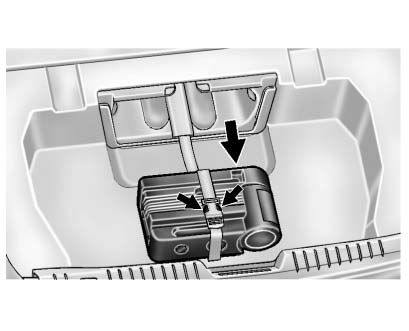
3. Pull the inflator kit rearward.
Squeeze the two tabs of the quick release buckle to remove the tire sealant and compressor kit.
To store the inflator kit, reverse the steps.
 Tire Sealant and Compressor Kit
WARNING
Idling a vehicle in an enclosed area with poor ventilation is dangerous. Engine
exhaust may enter the vehicle. Engine exhaust contains carbon monoxide (CO) which
cannot be seen or smelled ...
 Tire Changing
Removing the Spare Tire and Tools
To access the spare tire and tools:
1. Retainer Nut.
2. Tool Bag Tether.
3. Tool Bag.
4. Spare Tire.
1. Open the trunk.
2. Lift the load floor.
3. T ...
Other materials:
Service Publications Ordering Information
Service Manuals
Service Manuals have the diagnosis and repair information on the engines, transmission,
axle, suspension, brakes, electrical, steering, body, etc.
Service Bulletins
Service Bulletins give additional technical service information needed to knowledgeably
service General Motors c ...
Rear Side Door Weatherstrip Replacement - Door Side
Rear Side Door Check Bolt
Caution: Refer to Fastener Caution in the Preface section.
Tighten
25 N·m (19 lb ft)
Rear Side Door Weatherstrip - Door Side
Procedure
Unclip weatherstrip from rear side door.
When removing protective liners from adhesive tape, be care ...
Instrument Panel Accessory Bezel Replacement
Preliminary Procedure
Remove transmission control cover. Refer to Automatic or Manual Transmission
Control Lever Trim Cover Replacement.
Instrument Panel Accessory Bezel Screw (Qty: 4)
Caution: Refer to Fastener Caution in the Preface section.
Tighten
2.5 N·m (23 lb in).
Instrume ...
