
Chevrolet Cruze Repair Manual: Driver or Passenger Seat Side Inflatable Restraint Module Replacement
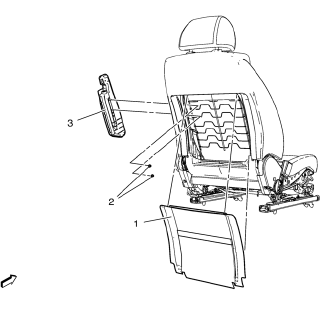
Warning: Refer to SIR Inflator Module Handling and Storage Warning in the Preface section.
Warning: Following the deployment of a side impact air bag, inspect the following parts for damage. Replace these parts if necessary:
- The seat cushion frame
- The seat recliner, if equipped
- The seat adjuster
- The seat back frame
Failure to do so may cause future personal injury.
Preliminary Procedure
Disable the SIR system. Refer to SIR Disabling and Enabling.
Front Seat Back Trim
Front Seat Side Inflatable Restraint Module Nut (Qty: 2)
Caution: Refer to Fastener Caution in the Preface section.
Tighten 4 N·m (36 lb in)
Front Seat Side Inflatable Restraint Module Assembly
Tip
Disconnect the electrical connector.
 Inflatable Restraint Steering Wheel Module Coil Centering
Caution: The new SIR coil assembly will be centered. Improper
alignment of the SIR coil assembly may damage the unit, causing an
inflatable restraint malfunction.
Verify the following condi ...
 Roof Side Rail Inflatable Restraint Module Replacement
Warning: In order to prevent SIR deployment, personal injury, or
unnecessary SIR system repairs, do not strike the door or the
door pillar in the area of the side impact sensor (SIS). Turn OFF ...
Other materials:
CD Player
The CD player is capable of playing:
• Most audio CDs
• CD-R
• CD-RW
• MP3, unprotected WMA, and AAC formats
When playing any compatible recordable disc, the sound quality may be reduced
due to the disc, the method of recording, the quality of the music recorded, or
how the disc has b ...
Securing Child Restraints (Front Passenger Seat)
This vehicle has airbags. A rear seat is a safer place to secure a forward-facing
child restraint.
In addition, the vehicle has a passenger sensing system which is designed to
turn off the right front passenger frontal airbag and passenger knee airbag under
certain conditions.
A label on the ...
Immobilizer Operation
This vehicle has a passive theft-deterrent system.
The system does not have to be manually armed or disarmed.
The vehicle is automatically immobilized when the key is removed from the ignition.
The system is automatically disarmed when the vehicle is started with the correct
key. The key uses a ...
