
Chevrolet Cruze Owners Manual: Engine Heater
The engine heater, if available, can help in cold weather conditions at or below −18°C (0°F) for easier starting and better fuel economy during engine warm-up. Plug in the heater at least four hours before starting the vehicle. An internal thermostat in the plug end of the cord will prevent engine heater operation at temperatures above −18°C (0°F).
To Use The Engine Heater
1. Turn off the engine.
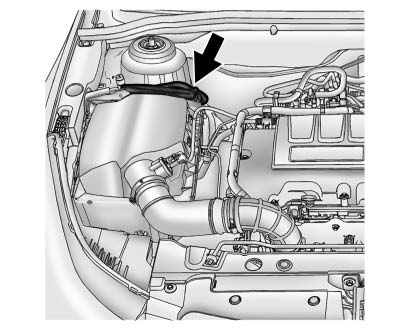
1.4L Engine Shown, 1.8L Similar
2. Open the hood and unwrap the electrical cord. The electrical cord is located on the passenger side of the engine compartment, behind the air cleaner.
3. Plug it into a normal, grounded 110-volt AC outlet.
WARNING
Plugging the cord into an ungrounded outlet could cause an electrical shock. Also, the wrong kind of extension cord could overheat and cause a fire. You could be seriously injured. Plug the cord into a properly grounded three-prong 110-volt AC outlet.
If the cord will not reach, use a heavy-duty three-prong extension cord rated for at least 15 amps
.
4. Before starting the engine, be sure to unplug and store the cord as it was before to keep it away from moving engine parts.
If you do not it could be damaged.
The length of time the heater should remain plugged in depends on several factors. Ask a dealer in the area where you will be parking the vehicle for the best advice on this.
 Starting the Engine
Place the transmission in the proper gear.
Notice: If you add electrical parts or accessories, you could change
the way the engine operates. Any resulting damage would not be covered by the vehicle ...
 Retained Accessory Power (RAP)
These vehicle accessories may be used for up to 10 minutes after the engine is
turned off:
• Audio System
• Power Windows
• Sunroof
The power windows and sunroof will continue to work for up to ...
Other materials:
Navigation System
If the vehicle has a navigation system, there is a separate navigation manual
that includes information on the radio, audio players, and navigation system.
The navigation system provides detailed maps of most major freeways and roads.
After a destination has been set, the system provides turn-b ...
Safety Belt Extender
If the vehicle's safety belt will fasten around you, you should use it.
But if a safety belt is not long enough, your dealer will order you an extender.
When you go in to order it, take the heaviest coat you will wear, so the extender
will be long enough for you. To help avoid personal inju ...
Satellite Radio
Vehicles with a SiriusXM® satellite radio tuner and a valid SiriusXM satellite
radio subscription can receive SiriusXM programming.
SiriusXM Satellite Radio Service
SiriusXM is a satellite radio service based in the 48 contiguous United States
and 10 Canadian provinces.
SiriusXM satellite rad ...
