
Chevrolet Cruze Repair Manual: Installation Procedure
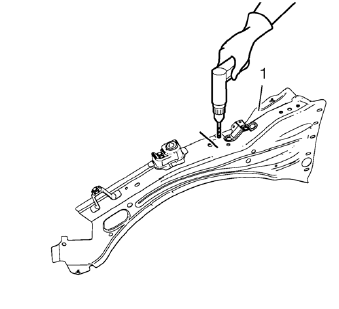
- Create 5 x 18 mm (4/16 x 11/16 in) slots for MIG-brazing (1).
- Clean and prepare the attaching surfaces for spot welding and brazing.
Note: In MIG-brazing areas 50 mm (2 in) must be kept clear of structural adhesive.
- Apply structural adhesive to all attaching surfaces.
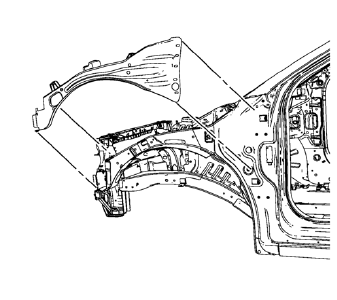
- Position the front compartment upper side rail on the vehicle.
- Verify the fit of the front compartment upper side rail.
- Clamp the front compartment upper side rail into position.
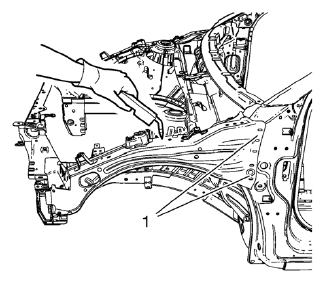
Note: MIG-braze factory slots in the front hinge pillar body area (1) as noted from the original panel.
- Braze accordingly.
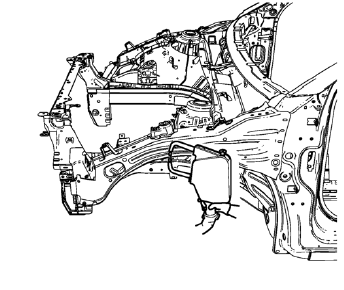
- Spot weld accordingly.
- Apply the sealers and anti-corrosion materials to the repair area, as necessary. Refer to Anti-Corrosion Treatment and Repair.
- Paint the repaired area. Refer to Basecoat/Clearcoat Paint Systems.
- Install all related panels and components.
- Connect the negative battery cable. Refer to Battery Negative Cable Disconnection and Connection.
- Enable the SIR system. Refer to SIR Disabling and Enabling.
 Removal Procedure
Warning: Refer to Approved Equipment for Collision Repair Warning in the
Preface section.
Warning: Refer to Glass and Sheet Metal Handling Warning in the Preface section.
Disable the SIR Syst ...
 Front Compartment Upper Side Rail Sectioning (MAG-Welding)
Note: According to different corrosion warranties, only the
regional mandatory joining methods are allowed. ...
Other materials:
Using the Navigation System
Use the NAV button on the faceplate or Home Page to access the navigation map.
Press the NAV button again to change between alternative views of the normal
split and full map views.
The Menu screen button at the bottom right side of the display accesses the Navigation
Menu.
The touch-sens ...
Traction Control System (TCS)
The traction control system limits wheel spin. The system is on when the vehicle
is started.
• To turn off traction control, press and release
on the center console.
illuminates in the instrument cluster.
• Press and release again to turn traction
control back on. ...
Reduced Engine Power Light
The reduced engine power light should come on briefly as the engine is started.
If it does not come on, have the vehicle serviced by your dealer.
This light, along with the malfunction indicator lamp, displays when a noticeable
reduction in the vehicle's performance occurs. Stop the vehic ...
