
Chevrolet Cruze Repair Manual: Removal Procedure
Warning: Refer to Approved Equipment for Collision Repair Warning in the Preface section.
Warning: Refer to Glass and Sheet Metal Handling Warning in the Preface section.
- Disable the SIR System. Refer to SIR Disabling and Enabling.
- Disconnect the negative battery cable. Refer to Battery Negative Cable Disconnection and Connection.
- Remove all related panels and components.
- Visually inspect the damage. Repair as much of the damage as possible.
- Remove the sealers and anti-corrosion materials from the repair area, as necessary. Refer to Anti-Corrosion Treatment and Repair.
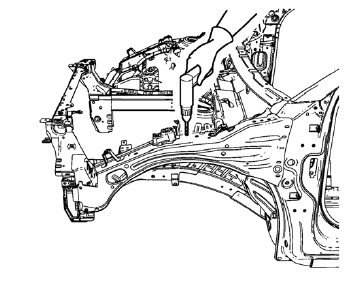
- Locate and mark all the necessary factory welds and weld seams of the front compartment upper side rail.
- Drill all factory welds. Note the number and location of welds for installation of the service assembly.
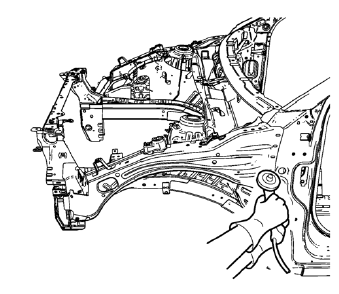
- Grind factory weld seams.
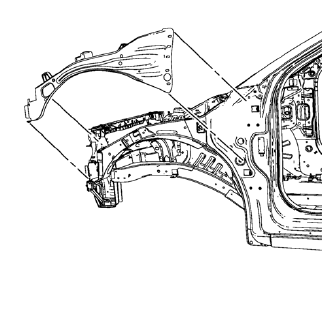
- Remove the front compartment upper side rail.
 Front Compartment Upper Side Rail Replacement (MIG-Brazing)
Note: According to different corrosion warranties, only the
regional mandatory joining methods are allowed. ...
 Installation Procedure
Create 5 x 18 mm (4/16 x 11/16 in) slots for MIG-brazing
(1).
Clean and prepare the attaching surfaces for spot welding and brazing.
Note: In MIG-brazing areas 50 mm (2 in) ...
Other materials:
Front Brake Rotor Replacement
Special Tools
CH-41013 Rotor Resurfacing Kit
CH-42450-A Wheel Hub Resurfacing Kit
For equivalent regional tools, refer to Special Tools.
Removal Procedure
Warning: Refer to Brake Dust Warning in the Preface section.
Raise and support the vehicle. Refer to Lifting and Jacking ...
Object Detection System Messages
PARK ASSIST OFF
This message displays when the park assist system has been turned off or when
there is a temporary condition causing the system to be disabled.
SERVICE PARK ASSIST
This message displays if there is a problem with the Ultrasonic Rear Parking
Assist (URPA) system. Do not use thi ...
Installation Procedure
Cut the quarter outer panel in corresponding locations to fit the
remaining original panel. The sectioning joint should be trimmed to
allow a gap of one-and-one-half-times the metal thickness at the sectioning
joint.
Create a 50 mm (2 in) backing plate from the unused portion
&nbs ...
