
Chevrolet Cruze Repair Manual: Installation Procedure
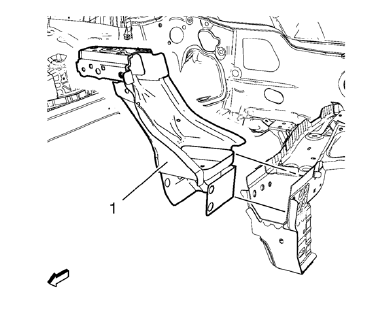
- Position the front end upper tie bar (1) on the vehicle.
- Verify the fit of the front end upper tie bar.
- Clamp the front end upper tie bar into position.
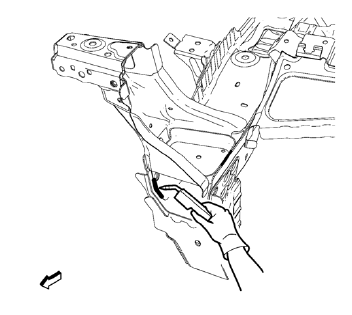
- Braze accordingly.
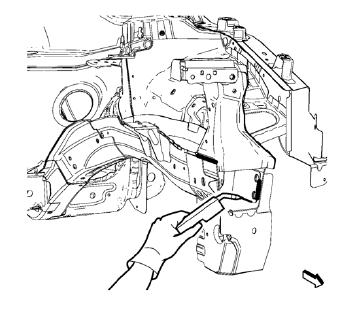
- Braze accordingly.
- Grind down weld seams as needed for related panels and components.
- Clean and prepare the attaching surfaces for welding.
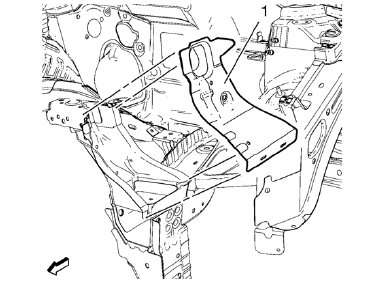
- Position the front end sheet metal cross panel reinforcement (1) on the vehicle.
- Verify the fit of the front end upper tie bar.
- Clamp the front end sheet metal cross panel reinforcement into position.
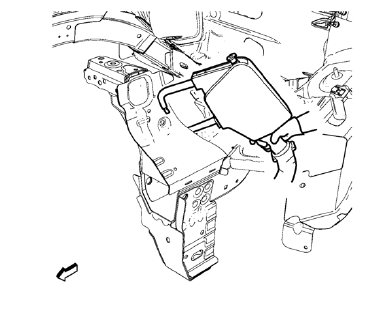
- Spot weld accordingly.
- Use factory slots for slot brazing.
- Install front bumper impact bar before applying the sealers and anti-corrosion materials.
- Apply the sealers and anti-corrosion materials to the repair area, as necessary. Refer to Anti-Corrosion Treatment and Repair
- Paint the repaired area. Refer to Basecoat/Clearcoat Paint Systems
- Install all related panels and components.
- Connect the negative battery cable. Refer to Battery Negative Cable Disconnection and Connection
- Enable the SIR system. Refer to SIR Disabling and Enabling
 Removal Procedure
Warning: Refer to Approved Equipment for Collision Repair Warning in the
Preface section.
Warning: Refer to Glass and Sheet Metal Handling Warning in the Preface section.
Disable the SIR System. ...
 Drivetrain and Front Suspension Frame Front Support Replacement (MAG-Welding)
Note: According to different corrosion warranties, only the
regional mandatory joining methods are allowed. ...
Other materials:
Installation Procedure
Cut the front compartment front rail in corresponding locations to fit
the remaining original panel. The sectioning joint should be
trimmed to allow a gap of one-and-one-half-times the metal thickness at the
sectioning joint.
Create a 50 mm (2 in) backing plate from the unused porti ...
Wipers and Washers
Specifications
Wiper/Washer Schematics
Windshield Wiper and Washer Switch Replacement
Preliminary Procedure
Remove the steering column trim covers. Refer to Steering Column Lower Trim
Cover Replacement.
Windshield Wiper and Washer Switch
Procedure
Disconnect any elect ...
Auxiliary Devices
This vehicle has an auxiliary input jack in the center console. Possible auxiliary
audio sources include:
• Laptop computer
• MP3 player
• Tape player
This jack is not an audio output.
Do not plug headphones into the auxiliary input jack. Set up any auxiliary device
while the vehicle is in ...
