
Chevrolet Cruze Repair Manual: Installation Procedure
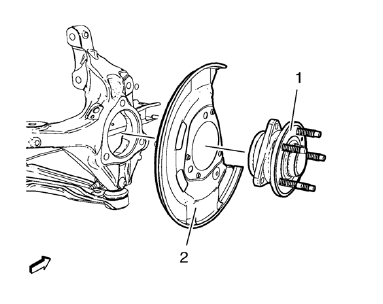
- Position the front brake shield (2) and front wheel bearing/hub (1) assembly in the steering knuckle.
Caution: Refer to Fastener Caution in the Preface section.
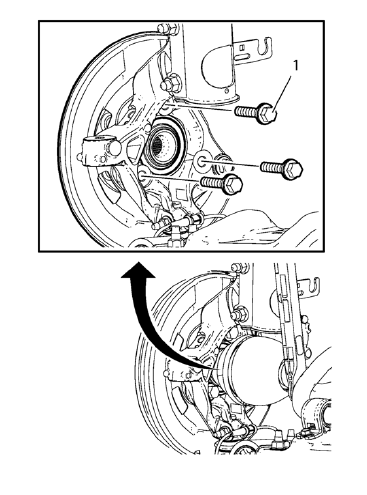
- Install the NEW front wheel bearing/hub bolts (1).
- Tighten the bearing/hub bolts (1) in 3 passes. Use the EN-45059 kit .
- First pass to 90 N·m (67 lb ft)
- Second pass to 60°
- Third pass to 15°
- Install the wheel drive shaft at the front wheel bearing/hub. Refer to Front Wheel Drive Shaft Replacement - Left Side or Front Wheel Drive Shaft Replacement - Right Side.
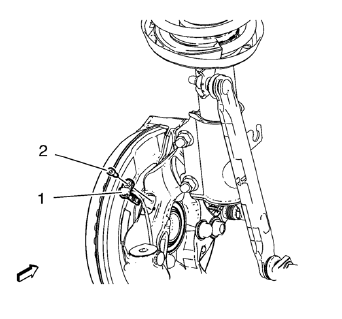
- Install the wheel speed sensor (1) to the steering knuckle.
- Install the wheel speed sensor screw (2) and tighten to 6 N·m (54 lb in).
- Install the brake rotor. Refer to Front Brake Rotor Replacement.
- Remove the support and lower the vehicle.
 Removal Procedure
Raise and support the vehicle. Refer to Lifting and Jacking the Vehicle.
Remove the brake rotor. Refer to Front Brake Rotor Replacement.
Remove the wheel speed sensor screw (2).
Remov ...
 Steering Knuckle Replacement
Preliminary Procedure
Raise and support the vehicle. Refer to Lifting and Jacking the
Vehicle
Remove the wheel bearing and hub assembly. Refer to Front Wheel Bearing
and Hub Repl ...
Other materials:
Removal Procedure
Warning: Refer to Cracked Window Warning in the Preface section.
Warning: Refer to Glass and Sheet Metal Handling Warning in the Preface section
Note: Position the vehicle on level ground and move the front
wheels to the straight-ahead position.
Disconnect battery.
Remove air inlet grill ...
Paint Gauges
Paint thickness gauge. measure the total thickness of the vehicle finish. It
is important to accurately measure the thickness of the finish on
each vehicle as the thickness of the finish will vary on each vehicle. Use a
paint gauge before the sanding process in order to accurately
measure how ...
Transmission Messages
SERVICE TRANSMISSION
This message displays if there is a problem with the transmission. See your dealer.
TRANSMISSION HOT — IDLE ENGINE
This message displays and a chime sounds if the transmission fluid in the vehicle
gets hot. Driving with the transmission fluid temperature high can cause dama ...
