
Chevrolet Cruze Repair Manual: Collision Repair
Specifications

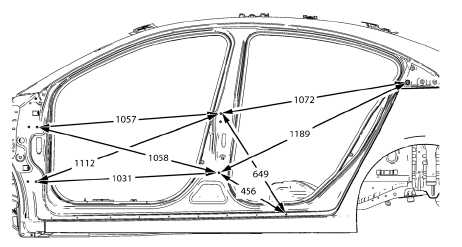
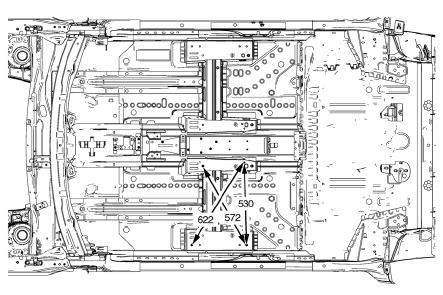
Point-to-point measurements are for reference only. All measurements are given in millimeters. Use these measurements for diagnosing and estimating. Point-to-point measurements are duplicated with tram bar pointers set at equal lengths. All die marks, holes, slots, and fasteners are measured to the center. All dimensions are symmetrical unless otherwise specified
Point-to-Point Measurements
Front End
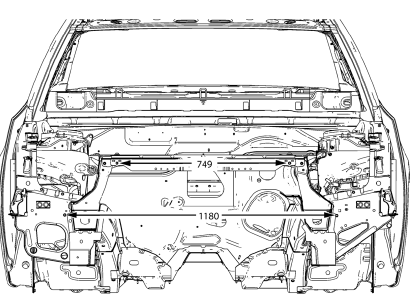
Engine Compartment
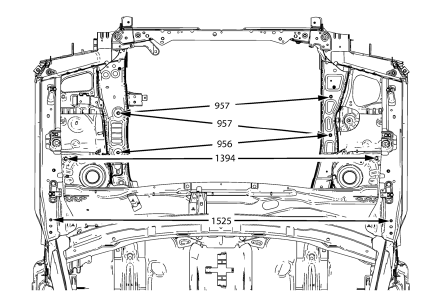
Front End Lower
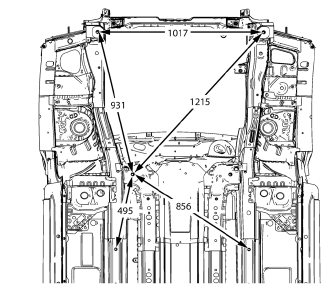
Rear End Lower
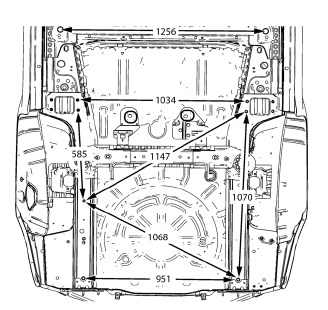
Rear End
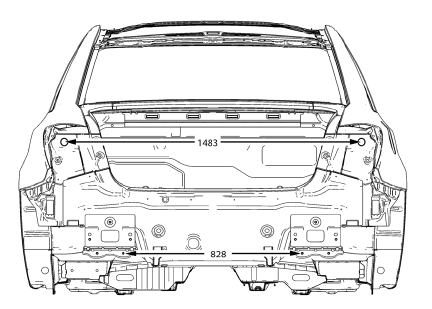
Side
Front Seat Mounting Points
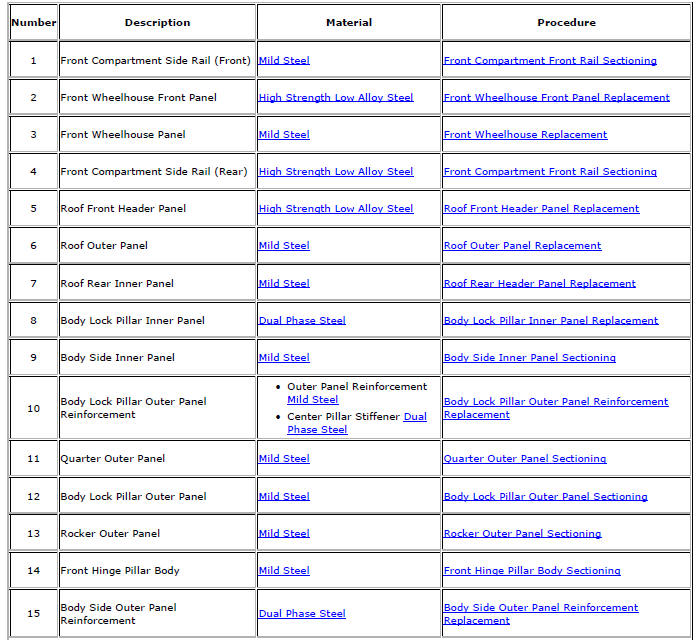
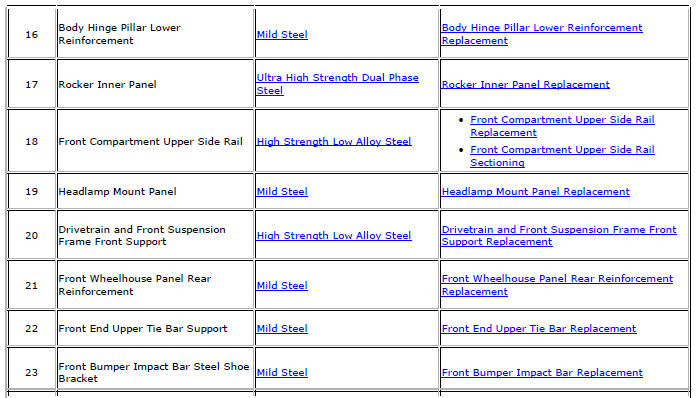
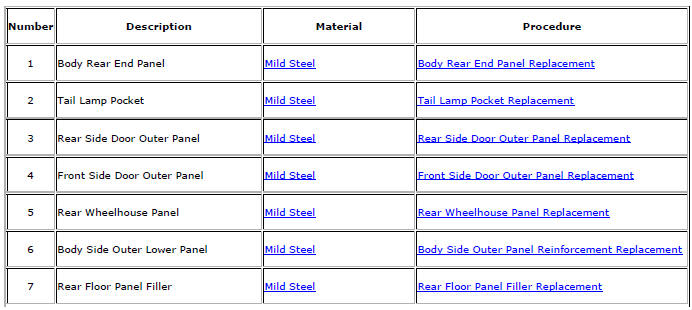
Structure Identification
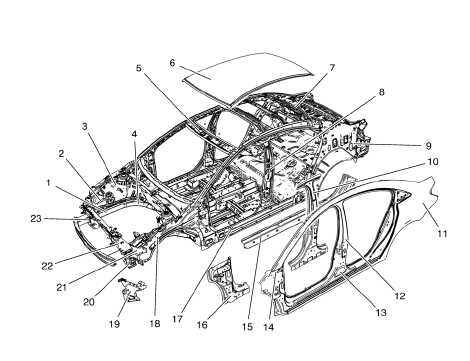
View Front
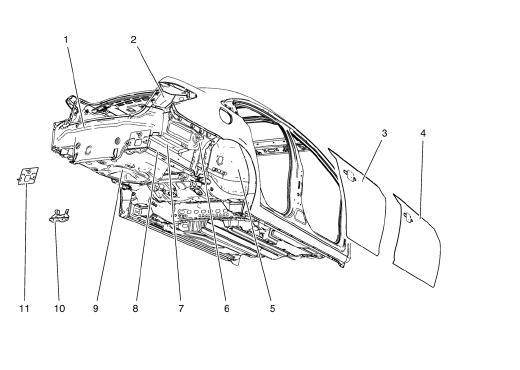
View Rear
- Overlap/Backing Plate Sectioning (Welding)
- Front Bumper Impact Bar Replacement
- Headlamp Mount Panel Replacement (MAG-Welding)
- Headlamp Mount Panel Replacement (MIG-Brazing)
- Front End Upper Tie Bar Support Sectioning (MAG Welding)
- Front End Upper Tie Bar Support Sectioning (MIG Brazing)
- Front End Upper Tie Bar Replacement (MAG-Welding)
- Front End Upper Tie Bar Replacement (MIG-Brazing)
- Drivetrain and Front Suspension Frame Front Support Replacement (MAG-Welding)
- Drivetrain and Front Suspension Frame Front Support Replacement (MIG-Brazing)
- Front Wheelhouse Front Panel Replacement (MAG-Welding)
- Front Wheelhouse Front Panel Replacement (MIG-Brazing)
- Front Wheelhouse Panel Replacement (MAG-Welding)
- Front Wheelhouse Panel Replacement (MIG-Brazing)
- Front Wheelhouse Panel Rear Reinforcement Replacement (MAG-Welding)
- Front Wheelhouse Panel Rear Reinforcement Replacement (MIG-Brazing)
- Front Compartment Upper Side Rail Replacement (MAG-Welding)
- Front Compartment Upper Side Rail Replacement (MIG-Brazing)
- Front Compartment Upper Side Rail Sectioning (MAG-Welding)
- Front Compartment Upper Side Rail Sectioning (MIG-Brazing)
- Front Compartment Side Rail Sectioning (Long, MAG-Welding)
- Front Compartment Side Rail Sectioning (Long, MIG-Brazing)
- Front Compartment Side Rail Sectioning (Short, MAG-Welding)
- Front Compartment Side Rail Sectioning (Short, MIG-Brazing)
- Front Hinge Pillar Body Sectioning (MAG-Welding)
- Front Hinge Pillar Body Sectioning (MIG-Brazing)
- Body Hinge Pillar Lower Reinforcement Replacement (MAG-Welding)
- Body Hinge Pillar Lower Reinforcement Replacement (MIG-Brazing)
- Roof Outer Panel Replacement (MAG-Welding)
- Roof Outer Panel Replacement (MIG-Brazing)
- Roof Front Header Panel Replacement (MAG-Welding)
- Roof Front Header Panel Replacement (MIG-Brazing)
- Roof Rear Header Panel Replacement (MAG-Welding)
- Roof Rear Header Panel Replacement (MIG-Brazing)
- Rocker Inner Panel Replacement (MAG-Welding)
- Rocker Inner Panel Replacement (MIG-Brazing)
- Body Lock Pillar Outer Panel Sectioning (MAG-Welding)
- Body Lock Pillar Outer Panel Sectioning (MIG-Brazing)
- Body Lock Pillar Outer Panel Reinforcement Replacement (MAG-Welding)
- Body Lock Pillar Outer Panel Reinforcement Replacement (MIG-Brazing)
- Body Lock Pillar Inner Panel Replacement (MAG-Welding)
- Body Lock Pillar Inner Panel Replacement (MIG-Brazing)
- Rocker Outer Panel Sectioning (MAG-Welding)
- Rocker Outer Panel Sectioning (MIG-Brazing)
- Body Side Outer Panel Reinforcement Replacement (MAG-Welding)
- Body Side Outer Panel Reinforcement Replacement (MIG-Brazing)
- Body Side Inner Panel Sectioning (MAG-Welding)
- Body Side Inner Panel Sectioning (MIG-Brazing)
- Body Side Outer Lower Panel Replacement (MAG-Welding)
- Body Side Outer Lower Panel Replacement (MIG-Brazing)
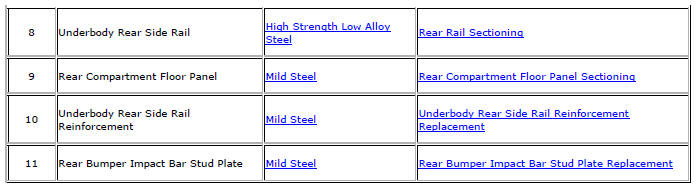
- Rear Compartment Floor Panel Sectioning (MAG-Welding)
- Rear Compartment Floor Panel Sectioning (MIG-Brazing)
- Rear Wheelhouse Panel Replacement (MAG-Welding)
- Rear Wheelhouse Panel Replacement (MIG-Brazing)
- Quarter Outer Panel Sectioning (MAG-Welding)
- Quarter Outer Panel Sectioning (MIG-Brazing)
- Body Rear End Panel Replacement (MAG-Welding)
- Body Rear End Panel Replacement (MIG-Brazing)
- Rear Bumper Impact Bar Stud Plate Replacement (MAG-Welding)
- Rear Bumper Impact Bar Stud Plate Replacement (MIG-Brazing)
- Front Side Door Outer Panel Replacement (MAG-Welding)
- Front Side Door Outer Panel Replacement (MIG-Brazing)
- Rear Side Door Outer Panel Replacement (MAG-Welding)
- Rear Side Door Outer Panel Replacement (MIG-Brazing)
- Rear Rail Sectioning (MAG-Welding)
- Rear Rail Sectioning (MIG-Brazing)
- Underbody Rear Side Rail Reinforcement Replacement (MAG-Welding)
- Underbody Rear Side Rail Reinforcement Replacement (MIG-Brazing)
- Rear Floor Panel Filler Replacement (MAG-Welding)
- Rear Floor Panel Filler Replacement (MIG-Brazing)
- Tail Lamp Pocket Replacement (MAG-Welding)
- Tail Lamp Pocket Replacement (MIG-Brazing)
- Dual Phase Steel
- High Strength Low Alloy Steel
- Mild Steel
- Ultra High Strength Dual Phase Steel
 Rear Bumper Impact Bar Replacement
Preliminary Procedure
Remove the rear bumper fascia. Refer to Rear Bumper Fascia Replacement.
Rear Bumper Energy Absorber Nut (Qty: 6)
Caution: Refer to Fastener Caution in the Preface sec ...
 Overlap/Backing Plate Sectioning (Welding)
Warning: Refer to Approved Equipment for Collision Repair Warning in
the Preface section.
Fit the service panel to the vehicle to ensure a proper fit.
Measure and mark a line at th ...
Other materials:
Front End Upper Tie Bar Replacement
Preliminary Procedure
Remove the front bumper fascia. Refer to Front Bumper Fascia
Replacement
Remove the radiator support bracket. Refer to Radiator Support Bracket
Replacement
Remove the radiator grille reinforcement support. Refer to Radiator
Grille Reinforcement Suppor ...
Bluetooth (Infotainment Controls)
For information about how to navigate the menu system using the infotainment
controls.
Pairing
A Bluetooth-enabled cell phone must be paired to the Bluetooth system and then
connected to the vehicle before it can be used. See your cell phone manufacturer's
user guide for Bluetooth functi ...
Rail Dust Damage Repair
Warning: Refer to Eye Protection Warning in the Preface section.
Note: If rail dust has penetrated into the basecoat, the panel
requires refinishing. Ensure all the rail dust has been removed prior to
refinishing or the rust spots will return.
Rail dust damage comes from the tiny iron particles ...
