
Chevrolet Cruze Repair Manual: Front Bumper Impact Bar Replacement
Removal Procedure
Warning: Refer to Approved Equipment for Collision Repair Warning in the Preface section.
Warning: Refer to Glass and Sheet Metal Handling Warning in the Preface section.
- Disable the SIR System. Refer to SIR Disabling and Enabling.
- Disconnect the negative battery cable. Refer to Battery Negative Cable Disconnection and Connection.
- Remove all related panels and components.
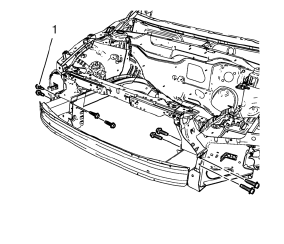
- Remove the 8 front bumper impact bar bolts (1).
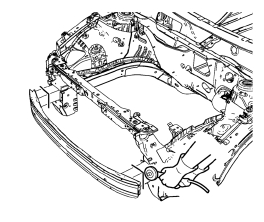
- Cut the front bumper impact bar left and right.
- Locate and mark all factory welds.
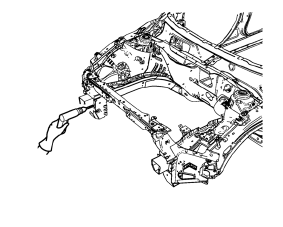
- Drill all factory welds.
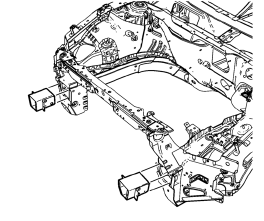
- Remove the remaining parts of 8. the front bumper impact bar.
Installation Procedure
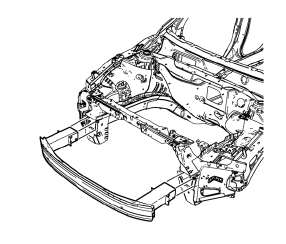
- Position the front bumper impact bar on the vehicle.
Caution: Refer to Fastener Caution in the Preface section.
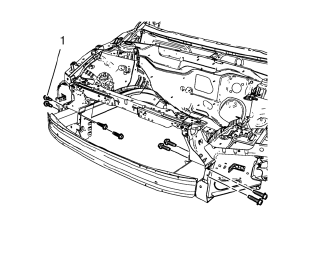
- Install the 8 front bumper impact bar bolts (1) and tighten to 110 N·m (81 lb ft).
Note: Use only the original front bumper impact bar bolts. Replace bolts if damaged.
- Paint the repaired area. Refer to Basecoat/Clearcoat Paint Systems.
- Install all related panels and components.
- Connect the negative battery cable. Refer to Battery Negative Cable Disconnection and Connection.
- Enable the SIR system. Refer to SIR Disabling and Enabling.
 Overlap/Backing Plate Sectioning (Welding)
Warning: Refer to Approved Equipment for Collision Repair Warning in
the Preface section.
Fit the service panel to the vehicle to ensure a proper fit.
Measure and mark a line at th ...
 Headlamp Mount Panel Replacement (MAG-Welding)
Note: According to different corrosion warranties, only the
regional mandatory joining methods are allowed.
Removal Procedure
Warning: Refer to Approved Equipment for Collision Repair Warning in t ...
Other materials:
Installation Procedure
Note: If the location of the original plug weld holes can not be
determined, space the plug weld holes every 40 mm (1½ in).
Drill 8 mm (5/16 in) for plug welding along the edges of the rear floor
panel filler as noted from the original
panel.
Clean and prepare the atta ...
Steering Column in Lock Position Caution
Caution: With wheels of the vehicle facing straight ahead, secure
the steering wheel utilizing steering column anti-rotation pin, steering
column lock, or a strap to prevent rotation. Locking of the steering column will
prevent damage and a possible malfunction of the SIR
system. The steering ...
Anti-Corrosion Treatment and Repair (Base)
Warning: When applying sound deadeners, or anti-corrosion materials
due care and preventative measures must be exercised to prevent
any material from being sprayed into door and quarter panel mechanisms such as
door locks, window run channels, window regulators and
seat belt retractors, as wel ...
