
Chevrolet Cruze Repair Manual: Front Fog Lamp Replacement
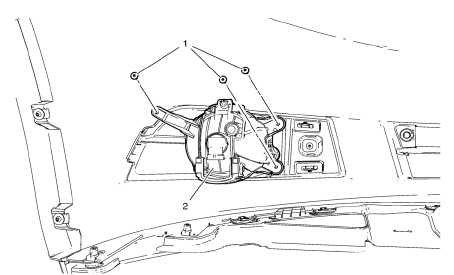
Preliminary Procedures
- Raise and support the vehicle. Refer to Lifting and Jacking the Vehicle.
- Remove the front bumper fascia. Refer to Front Bumper Fascia Replacement.
- Disconnect fog lamp bulb socket electrical connector.
Front Fog Lamp Screws (Qty: 3)
Caution: Refer to Fastener Caution in the Preface section.
Tighten 2.5 N·m (23 lb in)
Front Fog Lamp Assembly
Procedure
- Remove the lamp assembly from the fog lamp bracket.
- Aim the fog lamp after installation. Refer to Fog Lamp Aiming.
 Headlamp Aiming Procedure
Open the hood.
Measure from the floor to the center of the headlamp bulb. Some
headlamps have an aim dot marked on the headlamp lens.
At the screen, measure from the floor and place the h ...
 Front Fog Lamp Bulb Replacement
Preliminary Procedures
Raise and support the vehicle. Refer to Lifting and Jacking the Vehicle
Disconnect the forward lamp electrical harness connector from the fog
lamp bulb socket ...
Other materials:
Tire Pressure Monitor
This vehicle may have a Tire Pressure Monitor System (TPMS).
The low tire pressure warning light alerts to a significant loss in pressure
of one of the vehicle's tires. If the warning light comes on, stop as soon as possible
and inflate the tires to the recommended pressure shown on the T ...
Tire Rotation
Tires should be rotated every 12 000 km (7,500 mi).
Tires are rotated to achieve a uniform wear for all tires. The first rotation
is the most important.
Anytime unusual wear is noticed, rotate the tires as soon as possible, check
for proper tire inflation pressure, and check for damaged tires ...
Front Floor Panel Carpet Replacement
Preliminary Procedures
Remove front seats. Refer to Driver or Passenger Seat
Replacement.
Remove rear seat. Refer to Rear Seat Replacement.
Remove the front floor console. Refer to Front Floor Console
Replacement.
Remove front sill panels. Refer to Front Side Door Sil ...
