
Chevrolet Cruze Owners Manual: Instrument Cluster
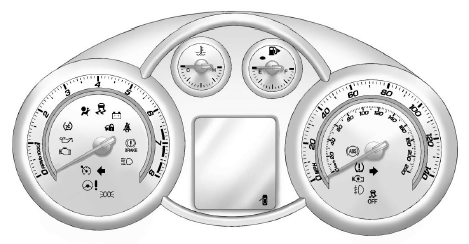
English Automatic Transmission Cluster Shown, Metric Similar
 Warning Lights, Gauges, and Indicator
Warning lights and gauges can signal that something is wrong before it becomes
serious enough to cause an expensive repair or replacement. Paying attention to
the warning lights and gauges could p ...
 Speedometer
The speedometer shows the vehicle's speed in either kilometers per hour (km/h)
or miles per hour (mph). ...
Other materials:
USB
Playing from a USB
A USB mass storage or Certified Windows Vista®/Media Transfer Protocol (MTP)
device can be connected to the USB port.
The USB port is in the center console.
The USB icon displays when the USB device is connected.
USB Media Formats
The USB port will support the following med ...
Engine Coolant
The cooling system in the vehicle is filled with DEX-COOL engine coolant. This
coolant is designed to remain in the vehicle for 5 years or 240 000 km (150,000
mi), whichever occurs first.
The following explains the cooling system and how to check and add coolant when
it is low. If there is a ...
Where Are the Airbags?
The driver frontal airbag is in the center of the steering wheel.
The front outboard passenger frontal airbag is in the passenger side instrument
panel.
The driver knee airbag is below the steering column. The front outboard passenger
knee airbag is below the glove box.
Driver Side Show ...
