
Chevrolet Cruze Owners Manual: Instrument Panel
Instrument Panel Overview
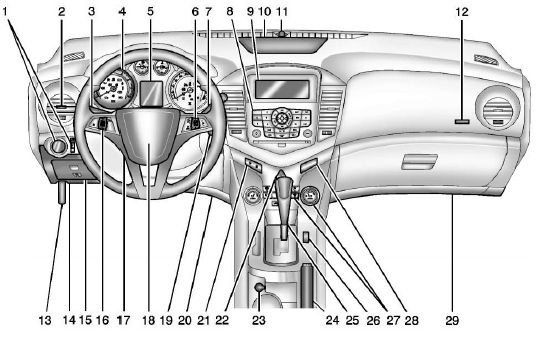
1. Exterior Lamp Controls
Front Fog Lamps
Instrument Panel Illumination Control
2. Air Vents
3. Headlamp High/Low-Beam Changer
Turn Signal Lever.
Driver Information Center (DIC) Buttons.
4. Instrument Cluster
5. Driver Information Center (DIC)
6. Steering Wheel Controls
7. Windshield Wiper/Washer
8. Infotainment
Satellite Radio
9. Infotainment Display Screen.
10. Instrument Panel Storage 11. Light Sensor.
12. Passenger Airbag.
13. Hood Release.
14. Data Link Connector (DLC) (Out of View).
15. Instrument Panel Fuse Block
6. Cruise Control
17. Steering Wheel Adjustment
18. Horn
Driver Airbag.
19. Ignition Switch or Keyless Ignition Button (If Equipped).
20. Driver Knee Airbag. See Where Are the Airbags?
21. Power Door Locks
22. Hazard Warning Flashers
23. Power Outlets
24. Parking Brake
25. Shift Lever.
26. Traction Control System (TCS)
StabiliTrak® System
27. Climate Control Systems
Automatic Climate Control
Heated Front Seats
28. Passenger Airbag Status Indicator
29. Passenger Knee Airbag.
 In Brief
...
 Initial Drive Information
This section provides a brief overview about some of the important features that
may or may not be on your specific vehicle.
For more detailed information, refer to each of the features which can b ...
Other materials:
Operation
Controls
The infotainment system is operated by using the pushbuttons, multifunction knobs,
menus shown on the display, and steering wheel controls, if equipped.
Turning the System On or Off
(Volume/Power): Press to turn the
system on and off.
Automatic Switch-Off
If the infotainment syste ...
Door Locks
To lock or unlock the vehicle from outside, use the Remote Keyless Entry (RKE)
transmitter or the key.
From inside the vehicle, use the power door lock switch.
Power Door Locks
: Press to unlock the doors.
: Press to lock the doors.
Safety Locks
The rear door safety locks prevent passenge ...
Tire Sealant and Compressor Kit
WARNING
Idling a vehicle in an enclosed area with poor ventilation is dangerous. Engine
exhaust may enter the vehicle. Engine exhaust contains carbon monoxide (CO) which
cannot be seen or smelled.
It can cause unconsciousness and even death. Never run the engine in an enclosed
area that has ...
