
Chevrolet Cruze Owners Manual: Mirror Adjustment
Exterior
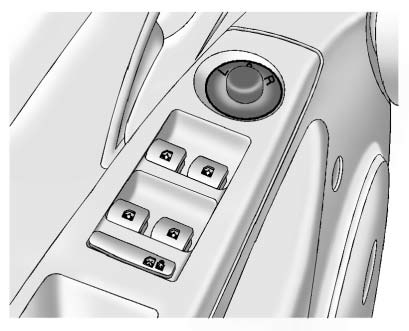
Controls for the outside power mirrors are on the driver door.
1. Turn the selector switch to L (Left) or R (Right) to choose the driver or passenger mirror.
2. Move the control to adjust the mirror.
3. Turn the selector switch to the O position to deselect the mirror.
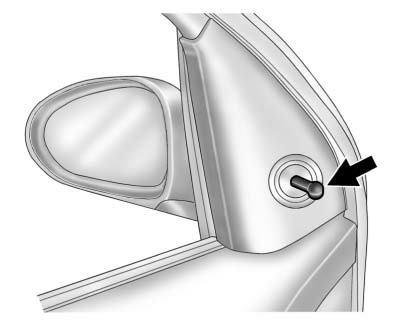
Vehicles with a manual mirror adjustment have controls next to each mirror.
Interior Mirror
Adjustment
Adjust the rearview mirror to view the area behind the vehicle.
Manual Rearview Mirror
If equipped with a manual rearview mirror, push the tab forward for daytime use and pull it for nighttime use to avoid glare from the headlamps from behind
Automatic Dimming Rearview Mirror
If equipped with an automatic dimming rearview mirror, the mirror will automatically reduce the glare of headlamps from behind. The dimming feature and indicator light come on each time the vehicle is started.
 Passenger Sensing System
United States
Canada
The passenger sensing system turns off the front outboard passenger frontal airbag
and knee airbag under certain conditions. No other airbag is affected by the passenger
...
 Steering Wheel Adjustment
To adjust the steering wheel:
1. Pull the lever down.
2. Move the steering wheel up or down.
3. Pull or push the steering wheel closer or away from you.
4. Push the lever up to lock the steering ...
Other materials:
Winter Driving
Driving on Snow or Ice
Drive carefully when there is snow or ice between the tires and the road, creating
less traction or grip.
Wet ice can occur at about 0°C (32°F) when freezing rain begins to fall, resulting
in even less traction.
Avoid driving on wet ice or in freezing rain until roads c ...
Steering Linkage Inner Tie Rod Replacement (Hydraulic Power Steering)
Special Tools
CH-6247 Removal and Installation Tool for the Steering Linkage Inner Tie Rod
For equivalent regional tools, refer to Special Tools.
Removal Procedure
Raise and support the vehicle. Refer to Lifting and Jacking the
Vehicle.
Remove the tire and wheel assembly. Refer to ...
Emergency
With Automatic Crash Response, the built-in system can automatically connect
to help in most crashes, even if help cannot be requested.
Press to connect to an Emergency
Advisor. GPS technology is used to identify the vehicle location and can provide
critical information to emergency personne ...
