
Chevrolet Cruze Repair Manual: Removal Procedure
Warning: Refer to Approved Equipment for Collision Repair Warning in the Preface section.
Warning: Refer to Collision Sectioning Warning in the Preface section.
Warning: Refer to Glass and Sheet Metal Handling Warning in the Preface section.
- Disable the SIR System. Refer to SIR Disabling and Enabling.
- Disconnect the negative battery cable. Refer to Battery Negative Cable Disconnection and Connection.
- Remove all related panels and components.
- Visually inspect the damage. Repair as much of the damage as possible.
- Remove the sealers and anti-corrosion materials from the repair area, as necessary. Refer to Anti-Corrosion Treatment and Repair.
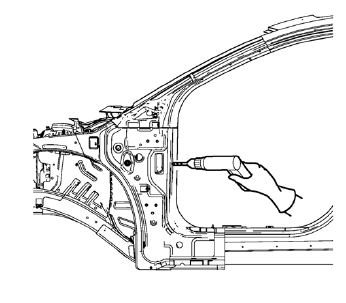
- Locate and mark all the necessary factory welds of the front hinge pillar body.
- Drill all factory welds. Note the number and location of welds for installation of the service assembly.
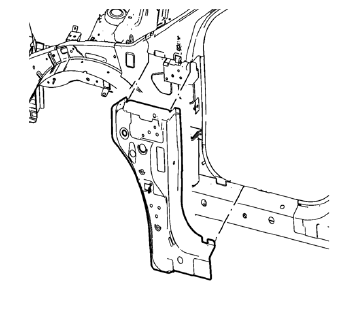
- Remove the damaged front hinge pillar body reinforcement
 Body Hinge Pillar Lower Reinforcement Replacement (MIG-Brazing)
Note: According to different corrosion warranties, only the
regional mandatory joining methods are allowed. ...
 Installation Procedure
Prepare all mating surfaces as necessary.
Align the front hinge pillar body reinforcement.
Create 6 x 20 mm (4/16 x 12/16 in) slots for MIG-brazing in locations
where you can not app ...
Other materials:
Replacing Airbag System Parts after a Crash
WARNING
A crash can damage the airbag systems in the vehicle.
A damaged airbag system may not work properly and may not protect you and your
passenger(s) in a crash, resulting in serious injury or even death. To help make
sure the airbag systems are working properly after a crash, have them in ...
Windshield Wiper/Washer
The windshield wiper/washer lever is on the right side of the steering column.
With the ignition in ACC/ ACCESSORY or ON/RUN, move the windshield wiper lever to
select the wiper speed.
HI: Use for fast wipes.
LO: Use for slow wipes.
INT: (Intermittent Wipes): Move the lever up to INT for ...
Front Side Door Adjustment
Preliminary Procedure
Remove the front wheelhouse liner. Refer to Front Wheelhouse Liner
Replacement.
Front Side Door
Caution: Refer to Fastener Caution in the Preface section.
Procedure
Loosen the front side door hinge bolt (Qty: 4) to adjust the front
side door.
Adjust the ...
