
Chevrolet Cruze Repair Manual: Windshield Washer Pump Seal Replacement
Removal Procedure
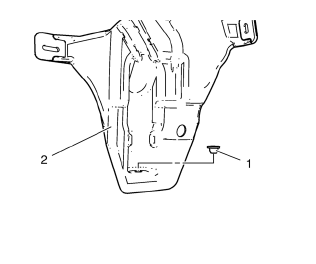
- Open the hood.
- Remove the windshield washer pump. Refer to Windshield Washer Pump Replacement
- Using a small flat-bladed tool, remove the washer pump terminal seal (1) from the washer solvent container (2).
Installation Procedure
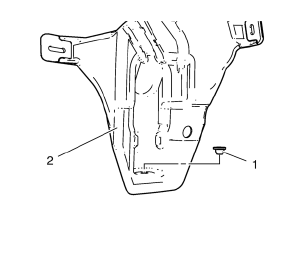
- Position the washer pump terminal seal (1) to the washer solvent container (2), pressing in until fully seated.
- Install the windshield washer pump. Refer to Windshield Washer Pump Replacement
- Close the hood.
Air Inlet Grille Panel Replacement
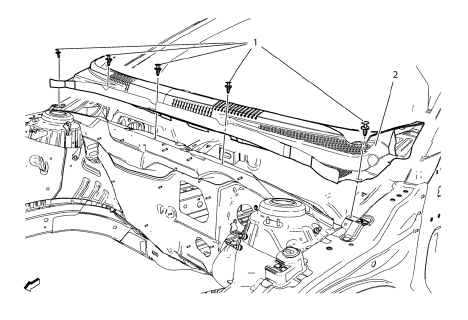
Preliminary Procedure
Remove the wiper arms. Refer to Windshield Wiper Arm Replacement.
- Air Inlet Grille Panel Clip (Qty: 5)
- Air Inlet Grille Panel Assembly
Procedure
Remove hood rear weatherstrip.
 Windshield Washer Pump Replacement
Removal Procedure
Remove the front wheelhouse liner. Refer to Front Wheelhouse Liner
Replacement.
Disconnect the washer pump electrical connector (1).
Disconnect the washer pump hose (2 ...
 Windshield Wiper Arm Replacement
Windshield Washer Arm Finish Cap
Tip
Use a small flat-bladed tool to remove finish cap.
Special Tools
BO-6626 Wiper Arm Puller
For equivalent regional tools, refer to Special Tools.
...
Other materials:
What Will You See after an Airbag Inflates?
After the frontal airbags and seat-mounted side impact airbags inflate, they
quickly deflate, so quickly that some people may not even realize an airbag inflated.
Roof-rail airbags may still be at least partially inflated for some time after
they inflate. Some components of the airbag module ma ...
Front Side Door Window Replacement
Preliminary Procedure
Position the window approximately half way down in the door.
Remove the water deflector. Refer to Front Side Door Water Deflector
Replacement.
Remove the outer sealing strip. Refer to Front Side Door Window Outer
Sealing Strip Replacement.
Fr ...
Loss of Control
Skidding
There are three types of skids that correspond to the vehicle's three control
systems:
• Braking Skid — wheels are not rolling.
• Steering or Cornering Skid — too much speed or steering in a curve causes tires
to slip and lose cornering force.
• Acceleration Skid — too much thro ...
