
Chevrolet Cruze Owners Manual: Automatic Headlamp System
When it is dark enough outside and the exterior lamp control is in the automatic position, the headlamps come on automatically.
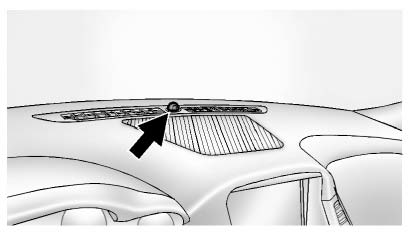
The vehicle has a light sensor on top of the instrument panel. Make sure it is not covered, or the headlamps will be on when they are not needed.
The system may also turn on the headlamps when driving through a parking garage or tunnel.
Lights On with Wipers
If the windshield wipers are activated in daylight with the engine on, and the exterior lamp control is in AUTO, the headlamps, parking lamps, and other exterior lamps come on. The transition time for the lamps coming on varies based on wiper speed. When the wipers are not operating, these lamps turn off.
Move the exterior lamp control to  or
or  to disable this feature.
 Daytime Running Lamps (DRL)
Daytime Running Lamps can make it easier for others to see the front of your
vehicle during the day. Fully functional daytime running lamps are required on all
vehicles first sold in Canada.
A li ...
 Hazard Warning Flashers
(Hazard Warning Flasher):
Press and momentarily hold this button on the instrument panel above the climate
control system, to make the front and rear turn signal lamps flash on and off. This
...
Other materials:
Intermediate Steering Shaft Replacement
Removal Procedure
Turn the steering wheel to the straight forward position and support it
from movement
Remove the 2 intermediate steering shaft bolts (1).
Remove the intermediate steering shaft (1).
Installation Procedure
Install the intermediate steering shaft ...
Driver or Passenger Seat Side Inflatable Restraint Module Replacement
Warning: Refer to SIR Inflator Module Handling and Storage Warning
in the Preface section.
Warning: Following the deployment of a side impact air bag, inspect the
following parts for damage. Replace these parts if
necessary:
The seat cushion frame
The seat recliner, if equipped
T ...
Vehicle Alarm System
This vehicle has a theft alarm system.
Arming the System
To arm the system, use the power door lock switch or the RKE transmitter to lock
the vehicle while exiting with the vehicle turned off.
The alarm arms after about 30 seconds after all the doors have been closed.
Press again and the syst ...
