
Chevrolet Cruze Repair Manual: Installation Procedure
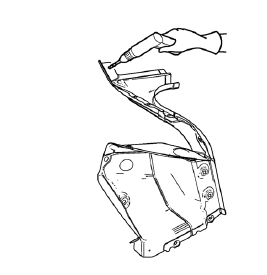
- Create 5 x 18 mm (4/16 x 11/16 in) slots for MIG-brazing along the edges of the tail lamp pocket as noted f rom the original panel.
Note:
- Clean and prepare the attaching surfaces for brazing.
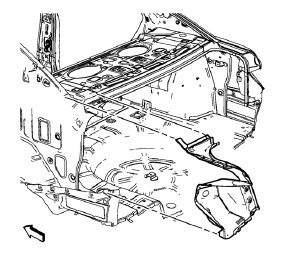
- Position the tail lamp pocket on the vehicle.
- Verify the fit of the tail lamp pocket.
- Clamp the tail lamp pocket into position.
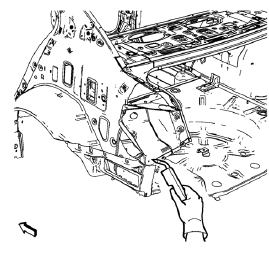
- Braze accordingly.
- Apply the sealers and anti-corrosion materials to the repair area, as necessary. Refer to Anti-Corrosion Treatment and Repair.
- Paint the repaired area. Refer to Basecoat/Clearcoat Paint Systems.
- Install all related panels and components.
- Connect the negative battery cable. Refer to Battery Negative Cable Disconnection and Connection.
- Enable the SIR system. Refer to SIR Disabling and Enabling.
 Removal Procedure
Warning: Refer to Approved Equipment for Collision Repair Warning in the
Preface section.
Warning: Refer to Glass and Sheet Metal Handling Warning in the Preface section.
Disable the SIR Syst ...
 Dual Phase Steel
This information provides repair recommendations and general guidelines for
steel classified as Dual Phase Steel (Dual Phase Steel with a
tensile strength up to and including 800 MPa), also known a ...
Other materials:
Rear Compartment Lid Emblem/Nameplate Replacement (Chevrolet)
Rear Compartment Lid Emblem Assembly
Caution: Refer to Exterior Trim Emblem Removal Caution in the Preface
section.
Procedure
The part and surface should be 21°C (70°F) prior to installation. The
vehicle should remain 21°C (70°F) for
one hour after assembly to allow adhesive to deve ...
Storing the Tire Sealant and Compressor Kit
The tire sealant and compressor kit is located in the trunk, under the load floor,
behind an access panel.
To remove the kit:
1. Open the trunk.
2. Turn the left knob counterclockwise and the right knob clockwise, 90 degrees,
at the same time. Then pull the access panel rearward and up to r ...
Transmission
Driver Shift Control (DSC) allows the automatic transmission to be shifted similar
to a manual transmission.
Electronic Range Select (ERS) allows for the selection of a range of gears.
Up-Shift Light
If the vehicle has a manual transmission, it will have an up-shift light that
indicates whe ...
