
Chevrolet Cruze Repair Manual: Removal Procedure
Warning: Refer to Approved Equipment for Collision Repair Warning in the Preface section.
Warning: Refer to Glass and Sheet Metal Handling Warning in the Preface section.
- Disable the SIR System. Refer to SIR Disabling and Enabling.
- Disconnect the negative battery cable. Refer to Battery Negative Cable Disconnection and Connection.
- Remove all related panels and components.
- Visually inspect the damage. Repair as much of the damage as possible.
- Remove the sealers and anti-corrosion materials from the repair area, as necessary. Refer to Anti-Corrosion Treatment and Repair.
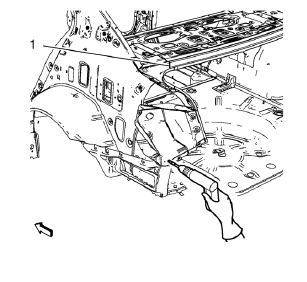
- Locate and mark all the necessary factory welds of the body rear end panel.
Note: Drill factory welds in area of the rear end upper panel reinforcement (1) from above. Create slots out of the drill holes for later brazing.
- Drill all factory welds. Note the number and location of welds for installation of the service assembly.
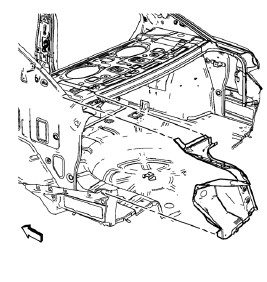
- Remove the tail lamp pocket.
 Tail Lamp Pocket Replacement (MIG-Brazing)
Note: According to different corrosion warranties, only the
regional mandatory joining methods are allowed. ...
 Installation Procedure
Create 5 x 18 mm (4/16 x 11/16 in) slots for MIG-brazing along the edges
of the tail lamp pocket as noted f rom the
original panel.
Note:
Clean and prepare the attaching surf ...
Other materials:
Danger, Warnings, and Cautions
Warning messages found on vehicle labels and in this manual describe hazards
and what to do to avoid or reduce them.
Danger indicates a hazard with a high level of risk which will result in serious
injury or death.
Warning or Caution indicates a hazard that could result in injury or death.
WA ...
Front Fog Lamps
For vehicles with front fog lamps, the button is on the outboard side of the
instrument panel.
The ignition must be on to turn on the fog lamps.
(Front Fog Lamps): Press
to turn the fog lamps on or off. An indicator light on the instrument cluster comes
on when the fog lamps are on.
The ...
Roof Side Rail Inflatable Restraint Module Replacement
Warning: In order to prevent SIR deployment, personal injury, or
unnecessary SIR system repairs, do not strike the door or the
door pillar in the area of the side impact sensor (SIS). Turn OFF the ignition
and remove the key when performing service in the
area of the SIS.
Warning: When pe ...
