
Chevrolet Cruze Owners Manual: Hazard Warning Flashers
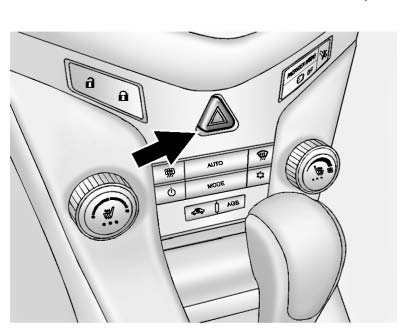
 (Hazard Warning Flasher):
Press and momentarily hold this button on the instrument panel above the climate control system, to make the front and rear turn signal lamps flash on and off. This warns others that you are having trouble.
Press and momentarily hold again to turn the flashers off.
 Automatic Headlamp System
When it is dark enough outside and the exterior lamp control is in the automatic
position, the headlamps come on automatically.
The vehicle has a light sensor on top of the instrument panel. Make ...
 Turn and Lane-Change Signals
Move the lever all the way up or down to signal a turn.
An arrow on the instrument cluster will flash in the direction of the turn or
lane change.
Raise or lower the lever until the arrow starts ...
Other materials:
Safety Belt Extender
If the vehicle's safety belt will fasten around you, you should use it.
But if a safety belt is not long enough, your dealer will order you an extender.
When you go in to order it, take the heaviest coat you will wear, so the extender
will be long enough for you. To help avoid personal inju ...
Heated Front Seats
WARNING
If you cannot feel temperature change or pain to the skin, the seat heater
may cause burns. To reduce the risk of burns, people with such a condition should
use care when using the seat heater, especially for long periods of time. Do not
place anything on the seat that insulates again ...
Danger, Warnings, and Cautions
Warning messages found on vehicle labels and in this manual describe hazards
and what to do to avoid or reduce them.
Danger indicates a hazard with a high level of risk which will result in serious
injury or death.
Warning or Caution indicates a hazard that could result in injury or death.
WA ...
