
Chevrolet Cruze Repair Manual: Removal Procedure
- Raise and support the vehicle. Refer to Lifting and Jacking the Vehicle.
- Remove the tire and wheel. Refer to Tire and Wheel Removal and Installation.
Note: DO NOT re-use the lower control arm bolts and nuts. Discard and use NEW only.
- Remove wheel speed sensor wiring harness from control arm and steering knuckle.
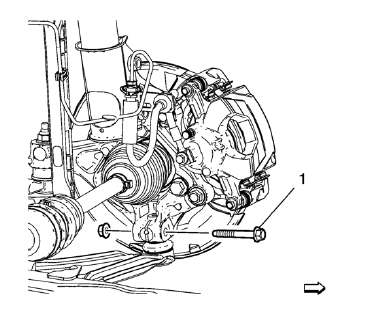
- Remove and DISCARD the lower ball joint to knuckle nut and bolt (1).
- Separate the lower control arm from the knuckle.
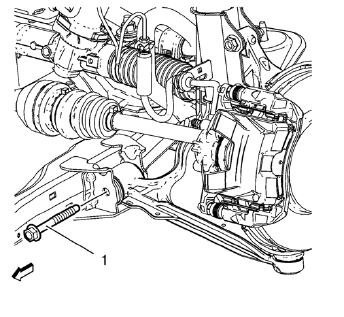
- Remove and DISCARD the front lower control arm nut and bolt (1).
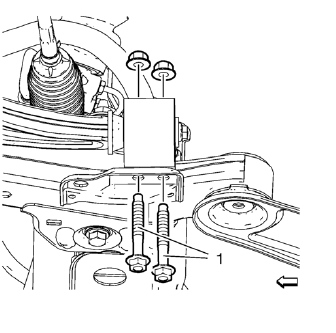
- Remove and DISCARD the rear lower control arm bushing nuts and bolts (1).
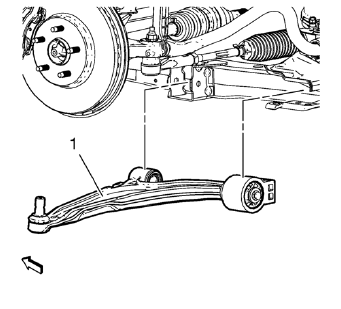
- Remove the lower control (1) arm from the front frame.
 Lower Control Arm Replacement
Special Tools
EN-45059 Torque Angle Sensor Kit
For equivalent regional tools, refer to Special Tools. ...
 Installation Procedure
Position the lower control arm (1) in the cradle.
Install and hand tighten the NEW rear lower control arm bushing nuts and
bolts (1).
Install and hand tighten the NEW fro ...
Other materials:
Maintenance Schedule
Owner Checks and Services
At Each Fuel Stop
• Check the engine oil level.
Once a Month
• Check the tire inflation pressures.
• Inspect the tires for wear.
• Check the windshield washer fluid level.
Engine Oil Change
When the CHANGE ENGINE OIL SOON DIC message or Code 82 DIC message dis ...
Rear Compartment Lid Emblem/Nameplate Replacement (Cruze - Left Side)
Rear Compartment Lid Emblem Assembly
Caution: Refer to Exterior Trim Emblem Removal Caution in the Preface
section.
Procedure
The part and surface should be 21°C (70°F) prior to installation. The
vehicle should remain 21°C (70°F) for
one hour after assembly to allow adhesive to deve ...
Steering Angle Sensor Calibration Warning
Warning: For vehicles with electric power steering (EPS) and without
a vehicle stability enhancement program, the steering angle sensor
MUST always be calibrated after the battery has been disconnected. Failure to
calibrate the steering angle sensor could limit the operation
of the EPS system ...
