
Chevrolet Cruze Repair Manual: Installation Procedure
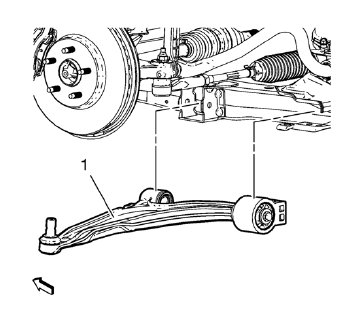
- Position the lower control arm (1) in the cradle.
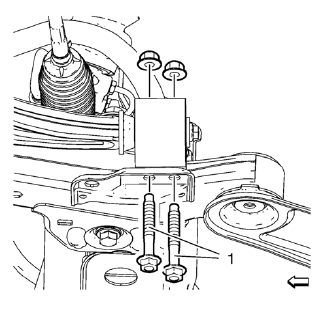
- Install and hand tighten the NEW rear lower control arm bushing nuts and bolts (1).
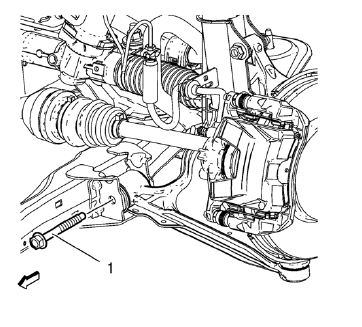
- Install and hand tighten the NEW front lower control arm nut and bolt (1).
Caution: Refer to Fastener Caution in the Preface section.
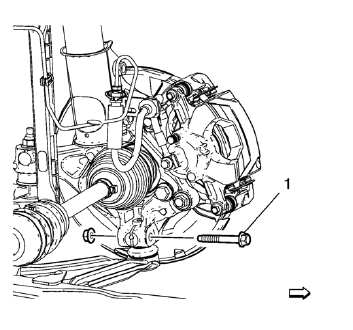
- Support the lower control arm with a hydraulic jack and lift the control arm into the neutral position.
- Tighten the front lower control arm bolt (1) to 70 N·m (52 lb ft) +75-90 degrees , using EN-45059 kit .
- Tighten the rear bushing to frame bolts to 55 N·m (41 lb ft) +45-60 degrees , using EN-45059 kit .
- Install the NEW ball joint to knuckle bolt and nut and tighten to 30 N·m
(22 lb ft) +60-75 degrees , using EN-45059 kit .
Lower the vehicle to the ground in order to tighten the control arm fasteners correctly.
- Remove the jack stand.
- Install the tire and wheel. Refer to Tire and Wheel Removal and Installation.
- Lower the vehicle.
 Removal Procedure
Raise and support the vehicle. Refer to Lifting and Jacking the
Vehicle.
Remove the tire and wheel. Refer to Tire and Wheel Removal and
Installation.
Note: DO NOT re-use the lower ...
 Front Lower Control Arm Bushing Replacement
Preliminary Procedure
Raise and support the vehicle. Refer to Lifting and Jacking the
Vehicle.
Remove the tire and wheel. Refer to Tire and Wheel Removal and
Installation.
Remo ...
Other materials:
Replacing LATCH System Parts After a Crash
WARNING
A crash can damage the LATCH system in the vehicle. A damaged LATCH system
may not properly secure the child restraint, resulting in serious injury or even
death in a crash. To help make sure the LATCH system is working properly after a
crash, see your dealer to have the system inspec ...
Door Locks
To lock or unlock the vehicle from outside, use the Remote Keyless Entry (RKE)
transmitter or the key.
From inside the vehicle, use the power door lock switch.
Power Door Locks
: Press to unlock the doors.
: Press to lock the doors.
Safety Locks
The rear door safety locks prevent passenge ...
Steering Wheel Inflatable Restraint Module Replacement
Removal Procedure
Warning: When carrying a live inflator module, make sure the bag opening
is pointed away from you. This minimizes the chance of injury
in the case of an accidental deployment. Never carry the inflator module by the
wires. Never carry the inflator module by the connector on
t ...
