
Chevrolet Cruze Repair Manual: Backup Lamp Replacement
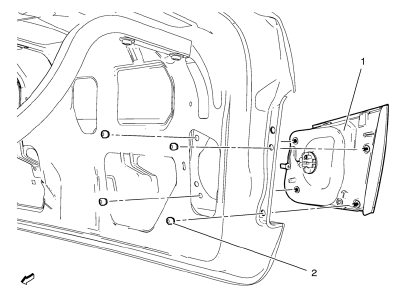
Preliminary Procedures
- Remove the rear compartment sill trim plate. Refer to Rear Compartment Sill Trim Plate Replacement.
- Disconnect the electrical harness connector from the backup lamp socket.
- Back Up Lamp Nut (Qty: 4)
Caution: Refer to Fastener Caution in the Preface section.
Tighten 5 N·m (44 lb ft)
- Back Up Lamp Assembly
Warning: Refer to Glass and Sheet Metal Handling Warning in the Preface section.
Warning: Refer to Halogen Bulb Warning in the Preface section.
Procedure
- Reach inside the rear compartment lid inner panel and remove the lower and upper retainer nuts securing the lamp assembly to the outer rear compartment lid panel.
- Push the inside edge of the lamp assembly outward from the rear outer compartment lid panel.
- Remove and transfer the bulb socket from the back up lamp assembly.
Backup Lamp Bulb Replacement
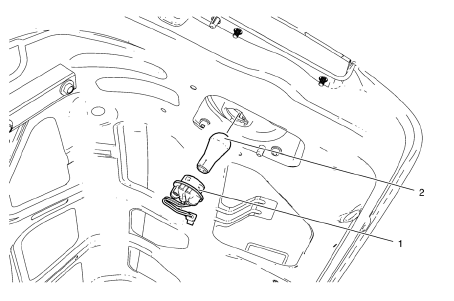
Warning: Refer to Glass and Sheet Metal Handling Warning in the Preface section.
Preliminary Procedure
Remove the rear compartment sill trim plate. Refer to Rear Compartment Sill Trim Plate Replacement.
- Back Up Lamp Socket
Tip
Rotate the lamp socket counterclockwise and remove from the tail lamp housing.
- Back Up Lamp Bulb
Warning: Refer to Halogen Bulb Warning in the Preface section.
Procedure
Remove the bulb from the lamp socket.
 Fog Lamp Aiming
Preparation Procedure
Important: Horizontal aim is not adjustable on this vehicle.
Vertical aim is done by an adjusting nut located on the rear of the fog lamp.
Prior to aiming the fog lamps, pe ...
 Forward Lamp Wiring Harness Replacement
Preliminary Procedures
Remove the front bumper. Refer to Front Bumper Fascia Replacement.
Remove the headlamp. Refer to Headlamp Replacement.
Using a scan tool, check for DTCs.
Forward ...
Other materials:
Power Steering Pump Belt Replacement
Special Tools
CH 49800 Installer Power Steering Pump Belt
For equivalent regional tools, refer to Special Tools.
Removal Procedure
Caution: Do not use belt dressing on the drive belt. Belt dressing
causes the breakdown of the composition of the drive belt. Failure
to follow this recommendatio ...
Winter Driving
Driving on Snow or Ice
Drive carefully when there is snow or ice between the tires and the road, creating
less traction or grip.
Wet ice can occur at about 0°C (32°F) when freezing rain begins to fall, resulting
in even less traction.
Avoid driving on wet ice or in freezing rain until roads c ...
Towing the Vehicle
Notice: Incorrectly towing a disabled vehicle may cause damage. The
damage would not be covered by the vehicle warranty. Do not lash or hook to the
chassis components including the front and rear subframes, suspension control arms
and links during towing and recovery of a disabled vehicle or t ...
