
Chevrolet Cruze Repair Manual: Forward Lamp Wiring Harness Replacement
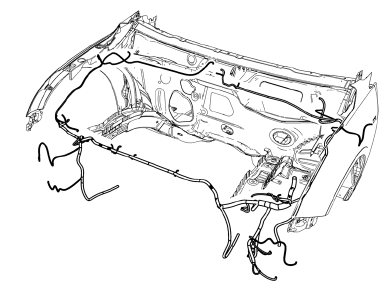
Preliminary Procedures
- Remove the front bumper. Refer to Front Bumper Fascia Replacement.
- Remove the headlamp. Refer to Headlamp Replacement.
- Using a scan tool, check for DTCs.
Forward Lamp Wiring Harness
Tip
- Create a work area large enough to lay out the new and old wiring harnesses.
- Use care when removing inaccessible harness retainers. Replacement retainers may not be available.
- Compare the new and old wiring harnesses for the same part number, the same number of wiring harness connectors, the same pin settings, and the same harness retainers.
- Follow a logical order of steps during the replacement to ensure proper installation of the harness.
Rear License Plate Lamp Replacement
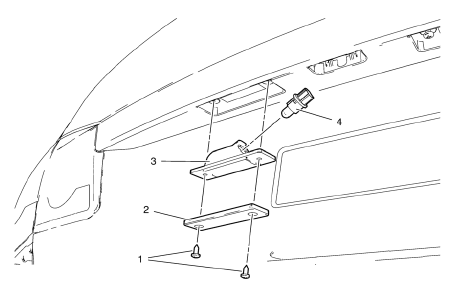
- Rear License Plate Lamp Screw (Qty: 2)
Caution: Refer to Fastener Caution in the Preface section.
Tighten 3 N·m (27 lb in)
- Rear License Plate Lamp
Tip
Rotate the left corner of the lamp assembly upward and pull the right side down out from the rear bumper fascia opening.
- Rear License Plate Lamp Socket
Tip
Rotate the lamp socket counterclockwise and remove.
- Rear License Plate Lamp Bulb
Tip
Service the bulb, as needed.
 Backup Lamp Replacement
Preliminary Procedures
Remove the rear compartment sill trim plate. Refer to Rear Compartment
Sill Trim Plate Replacement.
Disconnect the electrical harness connector from the backu ...
 Tail Lamp Replacement
Preliminary Procedures
Open and support the rear compartment
lid.
Remove the body side trim panel replacement in order to expose the tail
lamp pocket nuts. Refer to Body Side Tr ...
Other materials:
Side Blind Zone Alert (SBZA)
The vehicle may have a Side Blind Zone Alert (SBZA) system. Read this entire
section before using the system.
WARNING
SBZA does not detect vehicles rapidly approaching outside of the side blind
zones, pedestrians, bicyclists, or animals. Failure to use proper care when changing
lanes may res ...
Steering Linkage Inner Tie Rod Replacement (Electronic Power Steering)
Special Tools
CH-6247 Removal and Installation Tool for the Steering Linkage Inner Tie Rod
For equivalent regional tools, refer to Special Tools.
Removal Procedure
Raise and support the vehicle. Refer to Lifting and Jacking the
Vehicle.
Remove the tire and wheel assembly. Refer to ...
Removal Procedure
Warning: Refer to Approved Equipment for Collision Repair Warning in the
Preface section.
Warning: Refer to Glass and Sheet Metal Handling Warning in the Preface section.
Disable the SIR System. Refer to SIR Disabling and Enabling.
Disconnect the negative battery cable. Refer to Battery N ...
